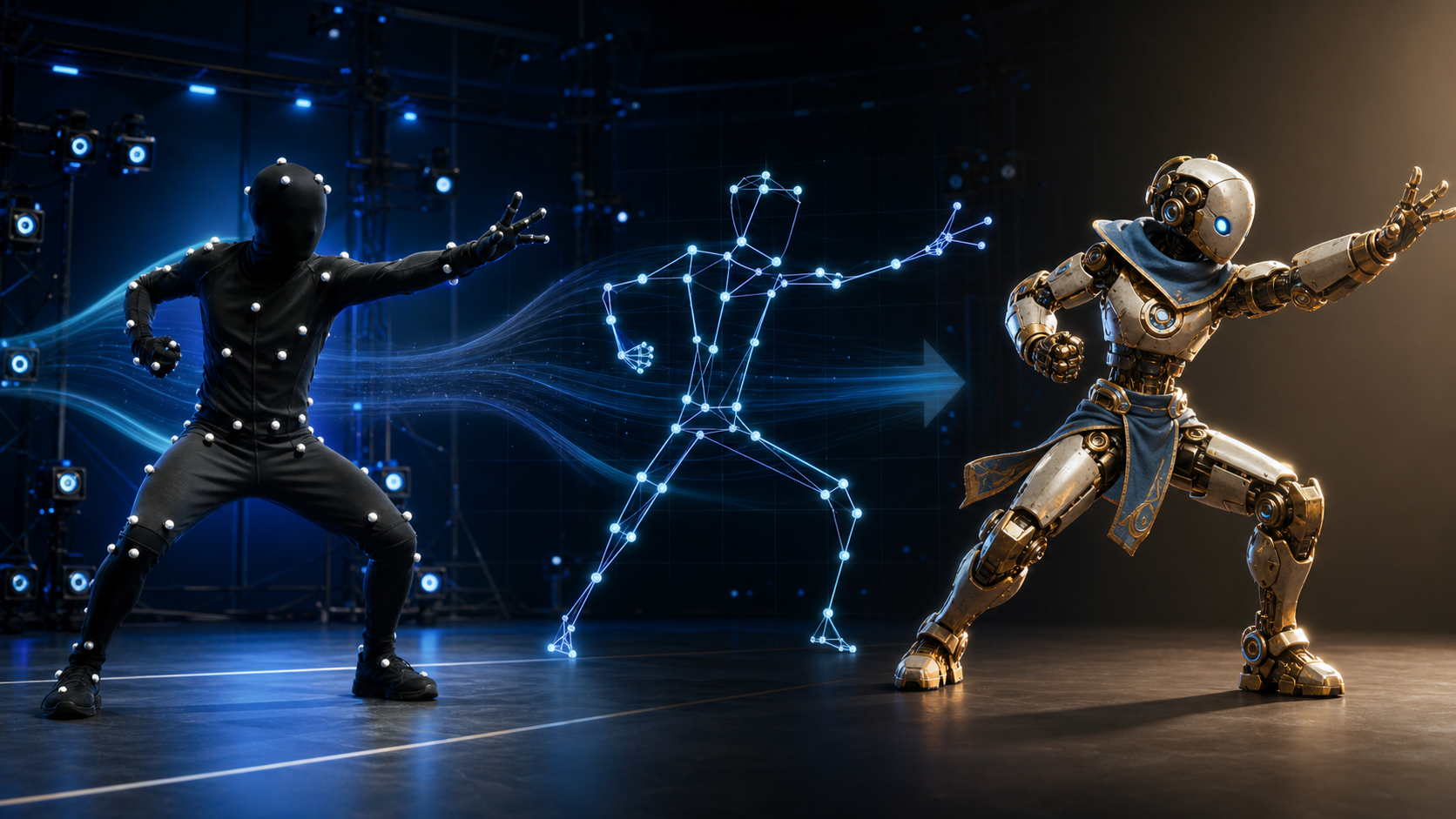
Motion capture—usually shortened to mocap—records physical movement and converts it into animation data. An actor performs, a capture system observes that performance, software solves it onto a digital skeleton, and the resulting motion drives a 3D character.
The appeal is not merely speed. Real performance contains weight shifts, balance corrections, acceleration, anticipation, and tiny timing variations that are difficult to reproduce convincingly by hand. Motion capture preserves much of that human complexity, while animators shape it into a finished performance.
Motion capture in simple terms
Every mocap workflow has three conceptual parts:
- Input: movement performed live or recorded in footage.
- Output: time-based transforms on a digital skeleton.
- Goal: reusable animation that carries the timing and physical intent of the performance.
Motion capture is one way to produce animation, not a replacement for animation as a craft. Raw data normally needs solving, retargeting, cleanup, and artistic revision before it is ready for a film, game, simulation, or virtual experience.
How motion capture works
Different systems use cameras, body-worn sensors, depth data, or computer vision, but the production pipeline is similar.
1. Capture
The system samples a person's movement over time. Optical stages track marker positions, inertial systems read sensor orientation and acceleration, and markerless systems estimate the body from video.
Capture quality begins with preparation:
- calibrated equipment;
- appropriate frame rate and shutter speed;
- enough space for the action;
- wardrobe that does not hide the body;
- a visible floor and clear foot contact;
- rehearsed start and end poses;
- synchronized props, face, hands, and audio where required.
2. Map observations into digital space
Raw observations must be interpreted as coordinates and orientations. Camera systems triangulate points across views. Inertial systems combine sensor readings into body-segment rotation. Markerless software estimates joint locations and depth.
This is not yet final animation. It is measured or inferred motion that may include missing frames, swapped markers, drift, and jitter.
3. Clean the data
Cleanup can include:
- filling short tracking gaps;
- filtering noise without erasing performance;
- correcting marker swaps;
- repairing foot sliding;
- aligning the floor;
- removing impossible joint motion;
- correcting root position and facing direction;
- trimming slate, calibration, and recovery movement.
Aggressive smoothing can make a lively performance feel weightless. Preserve the useful irregularities while removing technical errors.
4. Solve onto a skeleton
A solver converts captured observations into rotations and translations on a defined bone hierarchy. It uses body proportions, joint limits, contact assumptions, and other constraints to estimate the performance.
The quality of the solve depends on both capture data and the skeletal model. An incorrect performer calibration can make every joint appear subtly wrong.
5. Retarget to the production character
Retargeting transfers animation from the capture skeleton to the final rig. Because performers and characters have different proportions, a technically correct transfer can still create:
- hands missing a prop;
- feet penetrating or floating above the ground;
- knees bending incorrectly;
- shoulders raised by a mismatched reference pose;
- shortened or exaggerated strides;
- head and eye lines missing their targets.
Retargeting establishes a starting point. Animators then fix contact, silhouette, and performance.
The three main types of motion capture
Optical marker-based capture
An optical system places reflective or active markers on the performer. Multiple synchronized cameras observe those markers, and software triangulates their positions in 3D.
Strengths
- high spatial accuracy in a calibrated volume;
- detailed full-body performance;
- scalable multi-performer stages;
- established film and game workflows.
Tradeoffs
- studio space, cameras, calibration, and technical crew;
- markers can become occluded or confused;
- reflective surfaces and props need management;
- setup and cleanup time can be substantial.
Optical capture is appropriate when the project needs close technical control, large performance volumes, precise interaction, or a production pipeline built around stage data.
Inertial motion capture
Inertial systems place IMUs—typically accelerometers, gyroscopes, and sometimes magnetometers—on body segments. The suit estimates the orientation of each segment without needing an optical camera stage.
Strengths
- portable and quick to deploy;
- works outside a fixed studio;
- not affected by camera occlusion;
- practical for long walks, location work, and remote performers.
Tradeoffs
- positional drift over time;
- magnetic interference in some environments;
- floor contact and global position need correction;
- suits, gloves, and calibration add hardware overhead.
Inertial capture is useful when portability matters more than perfect world-space position.
Markerless motion capture
Markerless systems use computer vision to estimate body movement from one or more ordinary cameras. Some accept existing footage; others work from live video or multi-camera recordings.
Strengths
- no marker suit;
- accessible equipment;
- can work with pre-recorded performance;
- fast for prototypes, previs, independent animation, and content experiments.
Tradeoffs
- depth ambiguity from a single view;
- self-occlusion when limbs cross;
- hands, fingers, floor contact, and fast rotations can be difficult;
- accuracy varies by camera setup, solver, subject visibility, and action;
- output still requires cleanup and retargeting.
Markerless capture dramatically lowers the entry barrier, but “no suit” does not mean “no production discipline.”
Comparing motion capture methods
| Factor | Optical | Inertial | Markerless |
|---|---|---|---|
| Capture source | Multi-camera markers | Body-worn IMUs | Standard or depth video |
| Best strength | Accuracy and stage control | Portability | Accessibility |
| Main weakness | Cost, setup, occlusion | Drift and global position | Occlusion and depth ambiguity |
| Location | Calibrated volume | Nearly anywhere | Wherever video can be captured clearly |
| Performer setup | Marker suit and calibration | Sensor suit and calibration | Camera-ready clothing and framing |
| Existing footage | Usually no | No | Sometimes yes |
| Cleanup | Marker gaps and contacts | Drift and contacts | Jitter, contacts, and pose errors |
The “best” method is the one whose errors your project can tolerate and whose output fits the rest of the pipeline.
What motion capture is used for
Games
Mocap supplies locomotion, combat, interactions, sports movement, cutscenes, and large animation libraries. Gameplay often requires captured motion to be shortened, exaggerated, looped, or converted to in-place clips.
Film, television, and VFX
Performances can drive digital creatures, doubles, background characters, and previs. Facial and hand capture may be recorded alongside the body, but each uses different sensors and cleanup.
Virtual and augmented reality
Full-body tracking can drive avatars, remote presence, social VR, live virtual production, and interactive experiences. Low latency may matter more than perfect offline accuracy.
Sports and biomechanics
Researchers and coaches analyze gait, joint angles, technique, load, and movement patterns. These applications require validated measurement practices; an entertainment solver should not be assumed suitable for medical decisions.
Robotics, ergonomics, and simulation
Human motion informs workplace analysis, robot behavior, training simulations, and human-machine interaction.
Independent animation and social content
Accessible markerless systems let small teams turn a phone video into a rough skeletal performance. This can be valuable for animatics, prototypes, background characters, and short-form animation.
When a project needs only a rendered visual clip—not editable skeletal data—you can instead test an image-to-video workflow from an approved character image. The two outputs serve different needs: mocap feeds an animation rig, while image-to-video produces footage.
Motion capture versus keyframe animation
| Dimension | Motion capture | Keyframe animation |
|---|---|---|
| Source | A performed action | Poses designed by an animator |
| Natural weight | Captured from the performer | Created through animation skill |
| Stylization | Added through performance and editing | Precise and highly controllable |
| Iteration | Re-perform or edit captured curves | Revise poses, timing, and curves |
| Impossible motion | Limited by performance and setup | Can exaggerate beyond physical reality |
| Cleanup | Contacts, drift, noise, retargeting | Arcs, timing, spacing, interpolation |
Neither method wins universally.
Mocap works well for grounded, human movement and complex timing. Keyframing excels when motion must be stylized, impossible, tightly staged, or revised at frame level. Many productions combine them: capture a base, fix contacts, push silhouettes, exaggerate anticipation, and hand-key the final interaction.
How to choose a capture method
1. Define the required accuracy
An early game prototype does not need the same precision as a cinematic close-up, multi-actor stunt, or biomechanical study.
2. Set the real budget
Include more than hardware:
- stage or location;
- operators and performers;
- calibration and rehearsal;
- data processing;
- solver licenses;
- cleanup and animation;
- reshoots;
- retargeting and engine integration.
A cheap capture that needs extensive cleanup can be more expensive than a controlled shoot.
3. Decide where capture must happen
Choose optical for a controlled volume, inertial for location freedom, and markerless when video access and low setup matter.
4. List the details you need
Body-only capture is different from a performance requiring:
- fingers;
- facial expression;
- eye direction;
- props and contact;
- two performers touching;
- floor impact;
- seated movement;
- rapid spins;
- loose clothing.
5. Test the complete pipeline
Before the full session, capture one representative action, export it, retarget it, clean it, and view it on the real character in the destination engine. This reveals scale, axis, naming, reference-pose, and contact problems early.
Recording better markerless source video
Markerless systems benefit from deliberate footage:
- frame the whole body, including hands and feet;
- use a stable camera and adequate resolution;
- choose a fast enough shutter to limit motion blur;
- keep the performer separated from the background;
- use fitted clothing with visible limb contours;
- avoid long self-occlusions and crossed limbs;
- keep the floor visible;
- provide enough light and contrast;
- start and finish in stable neutral poses;
- record a second angle when the solver supports it.
For a single view, actions mostly parallel to the image plane are often easier than movement directly toward the lens.
From markerless solve to production animation
A normal workflow is:
- ingest and trim the source video;
- confirm frame rate and camera orientation;
- run body estimation and 3D solving;
- inspect joint confidence and occluded ranges;
- correct root motion and floor height;
- export to a supported skeletal format;
- map the source skeleton to the target rig;
- align reference poses;
- bake the animation;
- fix feet, hands, props, silhouette, and timing.
Markerless output is motion, not a finished character model. You still need a rigged target and an animation pipeline.
Responsible capture and consent
Movement is part of a person's performance and can be recognizable. Before recording or processing someone:
- obtain informed permission for capture and intended use;
- define whether the data can train models or only animate a project;
- restrict access to raw footage and biometric-like data;
- respect performer agreements, labor rules, and usage scope;
- do not use captured motion to misrepresent someone's actions or identity;
- delete or archive data according to the agreed retention policy.
Consent for a reference video does not automatically grant permission to reuse the person's face, voice, or performance in every context.
Motion-capture QA checklist
- Does the root move consistently and face the correct direction?
- Do feet stay planted during contact?
- Do hands meet props and other characters?
- Are joint angles anatomically plausible?
- Does the solved timing match the performance?
- Has smoothing removed important energy?
- Does the target rig preserve the intended silhouette?
- Are reference poses and scale aligned?
- Are loop boundaries clean where required?
- Are capture rights and performer approvals documented?
Conclusion
Motion capture is the bridge between physical performance and skeletal animation. Optical systems offer controlled accuracy, inertial suits provide portability, and markerless video makes capture accessible. All three still depend on the same craft: preparation, solving, cleanup, retargeting, and animation judgment.
Choose the least complicated method that meets the actual quality target. Then test the full path—from performer to final rig—before scaling up. A clean pipeline matters more than the novelty of the capture technology.
FAQ
Do you need a suit for motion capture?
Not always. Inertial systems use sensor suits, optical stages often use markers, and markerless systems can estimate motion from video without anything worn on the performer.
Can motion capture work from an ordinary video?
Yes, through markerless computer vision. Results depend on framing, resolution, blur, visibility, occlusion, action complexity, and the solver.
Is motion capture the same as animation?
Motion capture is one method of creating animation data. A finished result normally adds retargeting, cleanup, editing, and artistic performance work.
Which type is most accurate?
There is no universal ranking for every setup, but calibrated optical systems are commonly chosen when high spatial accuracy is critical. Accuracy still depends on the stage, marker set, calibration, solver, and cleanup.
How much does motion capture cost?
Costs range from accessible software using existing video to staffed optical stages with extensive hardware. Include cleanup, retargeting, labor, and reshoots when comparing budgets.
When should I use keyframe animation instead?
Use keyframes when the action is highly stylized, physically impossible, needs exact poses, or must be revised at frame level. A hybrid of capture and keyframing is often the strongest production approach.