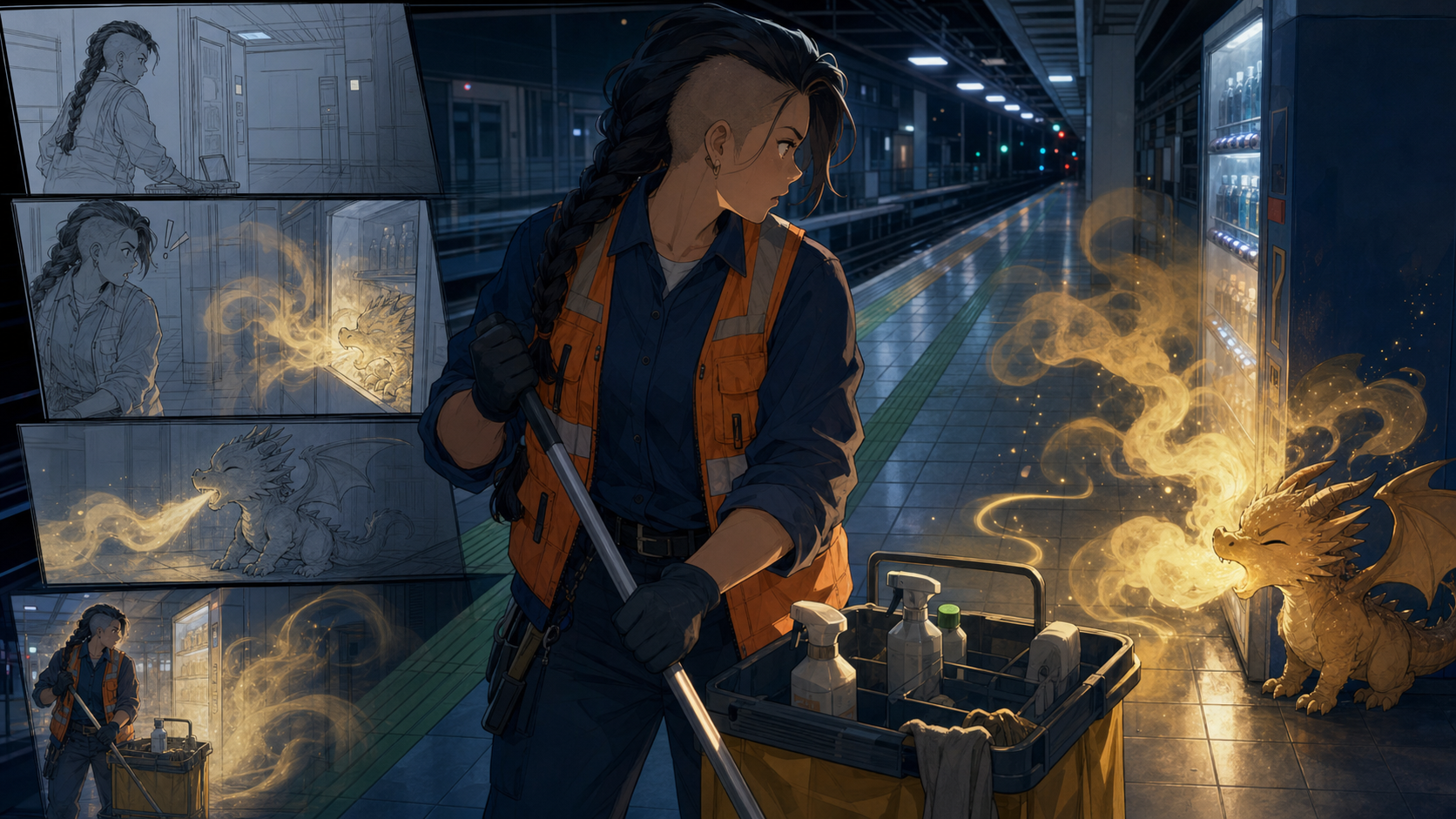
“An adult night-shift cleaner finds a tiny dragon living in a closed subway station.” That sentence is enough to start an anime story. It is not enough to generate one coherently.
A text-to-anime workflow must translate language into different kinds of decisions: what the protagonist looks like, how the dragon behaves, where the station entrances are, which event deserves a close-up, and what changes by the ending. Push all of that into one enormous prompt and the result is often a montage—attractive moments without a stable cast or readable cause and effect.
The better method is staged: story first, then character and world rules, then storyboard, final images, motion, and editing.
Turn the premise into a story promise
A premise says what is unusual:
An adult night-shift cleaner finds a tiny dragon living in a closed subway station.
A story promise says what the audience will experience:
In a two-minute warm comedy, a rule-following cleaner must hide a smoke-sneezing dragon from the first morning train.
The second sentence establishes protagonist, problem, tone, duration, and deadline. Those constraints shape every later generation. For a first project, choose one protagonist, one unusual element, one location, and one immediate problem. A small story can imply a large world; a large prompt often produces no story at all.
Write five visible beats
AI visual production becomes easier when each beat can be shown.
- The cleaner hears a sneeze behind a vending machine.
- She discovers a tiny dragon surrounded by golden smoke.
- The station announcement warns that the first train will arrive soon.
- The cleaner tries to guide the dragon into her cleaning cart.
- She hides the dragon inside—and the cart begins to glow.
Each beat contains a visible change. Avoid internal-only beats such as “she remembers childhood” unless a prop, expression, image, or action can communicate them. Write dialogue and sound after the visual action is clear.
At this stage, decide whether the story will become a 20–60 second video, a short sequence of panels, or four to eight comic pages. That limit keeps continuity manageable while still exposing the whole workflow.
Create a compact character bible
The protagonist does not need a novel-length biography. A useful character bible connects story function to recognition:
- Role: adult station cleaner on the night shift.
- Want: finish the shift without another complaint.
- Contradiction: strict about rules, instinctively protective of strays.
- Recognition anchors: sturdy build, shaved left side with a long dark braid, orange utility vest over navy work clothes, moon-shaped key ring at the right hip.
- Behavior: moves efficiently until the dragon appears, then becomes hesitant and gentle.
- Voice: practical, quiet, and dryly funny.
The dragon needs an equally compact block: small enough to fit inside the cart, broad ear-fins, charcoal scales with warm gold edges, a sneeze that produces smoke rather than fire, and wary but curious behavior. Repeat only the anchors necessary for recognition; allow pose and expression to change.
Establish the world with production rules
The subway station needs continuity notes:
- tiled platform with a green line near the edge;
- silver vending machine beside a square support column;
- cleaning cart with a yellow fabric bag and gray upper tray;
- cool fluorescent ceiling lights;
- service corridor behind a blue metal door;
- no passengers until the final beat.
These rules prevent the vending machine from changing color, the cart from switching sides, or the platform line from moving between shots. Make a simple overhead map and choose the direction of travel. Continuity depends as much on spatial logic as on character faces.
Convert beats into a storyboard
A storyboard is a decision document, not a gallery. Give each shot five fields: shot number, framing, visible action, dialogue or sound, and continuity note.
| Shot | Framing | Visible action | Sound | Continuity |
|---|---|---|---|---|
| 1 | Wide | Cleaner pushes cart along empty platform | Wheels, fluorescent hum | Cart on platform side |
| 2 | Medium | She freezes after a sneeze | Tiny sneeze behind machine | Vending machine beside column |
| 3 | Low close-up | Dragon emerges through gold smoke | Soft chirp | Dragon ear-fins down |
| 4 | Two-shot | Cleaner offers a cloth; dragon approaches | Train warning begins | Cleaner keeps right hand extended |
| 5 | Medium | Dragon enters cart; bag glows | Approaching rail rumble | Cart remains between cleaner and track |
Use sketches or rough generations here. Do not spend time polishing a shot until the sequence reads.
Generate scene images from stable blocks
Create reusable character and location blocks, then add only the shot-specific action. A scene prompt might combine:
Clearly adult station cleaner, sturdy build, shaved left side with long dark braid, orange utility vest over navy work clothes, moon-shaped key ring at right hip. Closed tiled subway platform with green edge line, silver vending machine beside square column, cool fluorescent night lighting. Medium two-shot: the cleaner extends a folded blue cloth toward a tiny charcoal dragon with broad ear-fins and gold-edged scales. The dragon steps cautiously out of thin golden smoke. Keep cart on the cleaner’s left, camera locked, clean cinematic anime linework, no text.
Generate small, comparable batches. Approve structure at thumbnail size, then inspect identity anchors, props, anatomy, and spatial continuity. Use text-to-image for the scene frames and save the chosen output, prompt, seed or settings where available, and a short continuity note.
Turn stills into motion without losing the story
Motion prompts should describe change over time:
The dragon sneezes once; its ear-fins lift, then relax. A small cloud of golden smoke expands and drifts upward. The cleaner recoils half a step. Camera remains locked. Preserve both faces, costumes, vending machine, platform line, and lighting.
One primary change per shot is easier to control than simultaneous running, speaking, camera rotation, smoke, and lighting changes. Use an approved frame as the input to an image-to-video workflow, keep early tests short, and review every clip for facial drift, costume changes, prop continuity, and background warping.
Cut on action when a longer movement would be unstable. A hand reaches toward the cart in one shot; the next begins with the dragon already inside. Editing can imply continuous action without requiring one difficult generation to show every intermediate frame.
Edit the story, not just the artifacts
Place every panel or shot in sequence and watch without stopping. Ask:
- Can a new viewer identify the protagonist and problem?
- Does each shot cause or motivate the next?
- Is the deadline—the approaching train—clear?
- Does the protagonist make a choice, or do events merely happen?
- Are any shots repeating information?
- Does the ending change the situation?
Fix story problems before cosmetic artifacts. A perfect reflection will not rescue a missing motivation. Trim repeated shots, strengthen the train warning, or change the order before spending another generation on details.
Rights and authorship
Use original characters and environments when you plan to publish commercially. Do not prompt for a protected franchise character and present the output as your property. Avoid living artists’ names; describe line, color, materials, and composition instead.
Write your own story, make deliberate shot choices, revise designs, edit timing, create dialogue, and keep working files that show those contributions. Obtain consent before using a recognizable person as a reference, and review the current platform terms before uploading sensitive assets or distributing commercial work.
Frequently asked questions
Can an AI anime generator create a complete story from one prompt?
It can produce a draft or idea sketch, but a coherent story still needs human control over beats, cast, continuity, pacing, and revision. One prompt cannot reliably hold every production decision.
How long should my first AI anime story be?
Aim for 20–60 seconds or four to eight comic pages. A short project exposes the full workflow without creating an unmanageable continuity burden.
Should I write the script or design the character first?
Write the premise and visible beats first. Then design the character to serve those actions. Otherwise you may create a detailed original character with no useful role in the story.
Conclusion
Text becomes an anime story through controlled translations. Turn the premise into a promise, convert it into visible beats, give the protagonist a contradiction and recognition anchors, establish world rules, storyboard the action, generate from stable references, animate one change per shot, and edit for cause and effect.
The generator supplies material; the creator supplies structure, judgment, and responsibility. When you are ready to test the process, explore DeepFake with one protagonist, one location, and one finishable story.