The easiest way to start AI anime is not to generate a full episode. Make one original character, one ten-second moment, and one clean edit.
Free AI video plans are excellent for that kind of proof of concept. They are usually poor foundations for unlimited production because credits, model access, watermarks, queue priority, resolution, and commercial rights may be restricted.
This beginner guide adapts the source article’s July 22, 2026 comparison of meaningful free and free-to-try routes. Plans change often, so verify the live dashboard, export screen, and terms before publishing or monetizing a result.
The Beginner Shortlist
| Tool or workflow | Best beginner use | Check before starting |
|---|---|---|
| DeepFake | Moving from character and storyboard ideas into focused video, lip-sync, and audio stages | Live models, credits, duration, output terms |
| Runway Free | One controlled image-to-video experiment | One-time credits, selected models, watermark |
| Adobe Firefly Free | Small renewable experiments across image, video, and audio | Daily allowance, active model, partner-model terms |
| Luma Free | Low-stakes motion drafts | Resolution, queue priority, watermark, commercial restrictions |
| HeyGen Free | A talking or singing anime portrait | Monthly quota, duration, region, web versus API terms |
These tools are not identical. Choose according to the next bottleneck, not the longest feature list.
What You Can Realistically Make for Free
With planning, a beginner can create:
- a five-to-fifteen-second character reveal;
- a short image-to-video loop;
- a talking original character;
- a lip-synced chorus close-up;
- a motion-comic panel;
- a thirty-second trailer assembled from short clips and stills;
- a storyboard or animatic for a longer project.
A fully generated three-minute music video or multi-scene episode will usually exceed free quotas. That does not make free tools useless. It makes them valuable for learning the pipeline and identifying which paid capability—if any—would remove the real bottleneck.
1. DeepFake: Best Anime-Workflow Starting Point
For a beginner, continuity between stages matters more than having every advanced control. Start from an approved character rather than a generic video prompt. Design the face and outfit, make a small reference sheet, plan the shots, and animate only selected images.
DeepFake offers relevant routes for models, image-to-video motion, lip sync, music, and sound, but the project should still be planned shot by shot. A sensible first workflow is:
- browse the available models;
- approve an original character reference;
- storyboard six short shots;
- animate the shots that genuinely need motion;
- add dialogue or music only after the picture works;
- edit and export outside the generator when needed.
Check the current account and model details rather than relying on an old quota.
2. Runway Free: Best First Image-to-Video Experiment
The source’s July 2026 snapshot describes Runway Free as a one-time credit allocation with selected tools, watermarked video, and no unrestricted access to the newest premium model.
That makes it ideal for one controlled test. Animate:
- a blink;
- a slow head turn;
- light hair or fabric movement;
- a small camera push;
- a character taking one or two steps.
Five seconds can reveal whether the illustration survives motion. Use one clear reference and one action. Review the current watermark, credit, model, and rights information before treating the result as a final asset.
3. Adobe Firefly Free: Best for Daily Creative Practice
The source positions Firefly’s free access as limited renewable experimentation across image, video, and audio. Unlike a one-time allocation, a recurring allowance encourages small daily tests.
Use those tests to build a visual bible:
- character variations;
- backgrounds and props;
- palette and lighting;
- camera distance;
- simple motion ideas;
- sound-effect sketches.
If the project already finishes in Photoshop, After Effects, Premiere, or Adobe Express, the handoff may be smoother than working with an isolated generator.
Adobe’s own models and partner models can carry different terms. Record the exact model selected for each asset.
4. Luma Free: Best for Low-Stakes Motion Drafts
The source describes Luma’s free web plan as limited, draft-quality, lower-priority, watermarked, and non-commercial. Treat it as a moving sketchbook rather than a final-delivery pipeline.
Test whether a scarf, coat, hair silhouette, or camera move behaves as intended. If the draft works, rebuild the shot in a production workflow with appropriate output rights and quality.
Always inspect the active model label and live plan. Free access pages and older tutorials can preserve outdated terminology.
5. HeyGen Free: Best Speaking or Singing Anime Avatar
HeyGen is a specialist option for an original-character introduction, visual-novel exchange, narrator, virtual host, or music-video close-up. The source highlights Avatar IV as a fit for stylized, 2D, 3D, virtual, and non-human characters.
Prepare:
- a clean front or three-quarter portrait;
- a visible, neutrally relaxed mouth;
- a simple background;
- clear audio;
- a short script or vocal segment.
Avatar V may be newer, but the source positions it for real-human digital twins. For anime art, Avatar IV may be the better fit. A higher number does not automatically mean a better model for the subject.
If a real likeness or voice is involved, obtain explicit consent and follow the platform’s verification requirements.
Premium Tools Beginners Will Hear About
Several widely discussed models may require paid access or vary sharply by region and platform.
Kling 3.0
The source describes Kling 3.0 as a multimodal video family with native audio and broad cinematic ambition. It may be a useful upgrade for full scenes, but verify the authorized interface, region, and available credits.
Seedance 2.0
The source highlights Seedance for multimodal generation and editing through selected products. It becomes more useful when you already have reference images, video, audio, or an animatic.
Google Veo 3.1
The source positions Veo 3.1 for cinematic generation, audio, and reference-guided workflows across Google products. Features and quotas can differ between surfaces.
Runway and Luma premium models
Premium production tiers can add control, output quality, and integration. Upgrade only after a free proof of concept shows that the improvement will save more revision time than it costs.
Your First 30-Second AI Anime Project
The following exercise keeps the source article’s concrete example because it teaches the entire workflow without demanding a complex action sequence.
Step 1: Write a tiny story
Use three beats:
- the character wants something;
- something changes;
- the character reacts.
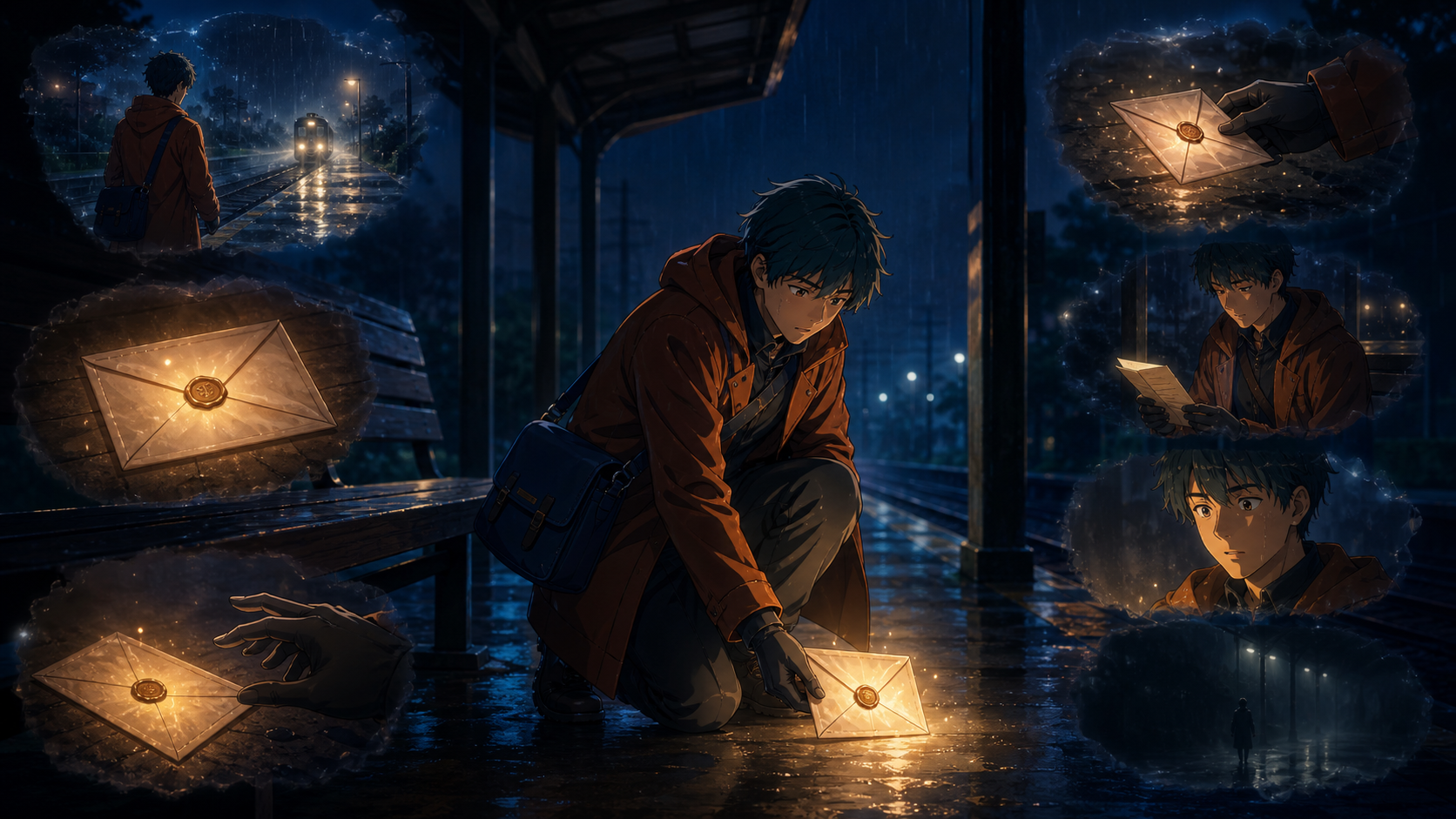
Example: an adult courier reaches an empty train platform, sees a glowing letter on a bench, and realizes it is addressed in their own handwriting.
That is enough material for six to eight shots. The story is small, but it gives every image a purpose.
Step 2: Create the character sheet
Make:
- front portrait;
- three-quarter view;
- profile;
- full-body view;
- four useful expressions;
- one close-up of the signature prop.
Lock eye color, hair silhouette, outfit layers, palette, proportions, and one memorable object such as a satchel. Avoid many tiny accessories because video models can lose them.
Keep every reference in one organized folder with stable filenames. This is the character’s visual contract.
Step 3: Storyboard six shots
Use a simple sequence:
- wide view of the empty platform;
- medium shot as the courier enters;
- insert of the glowing letter;
- hand reaching toward it;
- close-up as the courier reads;
- reaction, then cut to black.
Assign roughly two to five seconds per shot. A still image and a subtle camera move may be enough for shots that do not need generated character motion.
Step 4: Animate only what matters
Spend free video credits on the entrance, hand reach, and reaction. Use a still establishing frame with parallax. Animate the letter glow locally. Hold the strongest close-up.
For the walking shot, a reference-driven prompt might say:
Preserve the exact character, coat, satchel, hair, and palette from the reference. The courier takes two cautious steps and stops. Slow side-tracking camera. Hair and coat hem respond lightly. No facial redesign, wardrobe change, or additional character.
Prompt the change, not the appearance. The reference should carry the design.
An image-to-video workflow is particularly useful here because the approved frame anchors the character before motion begins.
Step 5: Add sound and edit
Use a few purposeful sounds:
- distant train ambience;
- footsteps on a wet platform;
- quiet electrical hum from the letter;
- paper movement;
- one restrained music cue.
Sound makes separate AI clips feel like one scene. Add dialogue only if it strengthens the story.
Edit around failures. Cut before a hand breaks. Hold a strong frame longer. Insert the letter. Use a brief flash or hard graphic cut when a transition needs energy. Anime already uses held poses and stylized transitions; those are creative strengths, not compromises.
How to Spend Free Credits Wisely
Test the shortest duration first
Prove the composition and motion before generating a longer clip.
Use one reference and one action
Do not ask a model to redesign the character, change locations, perform three moves, and orbit the camera in the same shot.
Save every prompt and setting
Record:
- model and mode;
- aspect ratio;
- duration;
- reference file;
- complete prompt;
- seed or repeatability control when available;
- result and revision notes.
Reproducibility matters when a shot succeeds.
Compare approval rate
Count how many attempts produce a usable result. The platform with the cheapest single generation may be expensive if almost every output fails.
Check rights before polishing
Do not spend hours editing a watermarked, non-commercial, copyrighted, or unauthorized asset into a client project.
Beginner Mistakes to Avoid
- Starting with a fight scene, crowd, or long camera move.
- Using a copyrighted character because it seems easier to prompt.
- Changing the art style between every shot.
- Animating a comic panel before removing speech balloons and borders.
- Making the character too small to review.
- Buying several subscriptions before a free test identifies the real bottleneck.
- Using a real face, voice, or identity without permission.
- Mistaking generation for filmmaking.
The story, shot choice, timing, sound, and edit create the experience. Generation supplies raw material.
Frequently Asked Questions
What is the best free AI anime video generator for beginners?
DeepFake is a practical model-and-workflow starting point, Runway Free is useful for a controlled image-to-video test, Adobe Firefly supports recurring experiments, Luma Free serves as a motion sketchbook, and HeyGen is suited to talking or singing portraits.
Can I make AI anime without drawing?
Yes. Image generators can create source art, but you still need to direct the design, select consistent references, plan shots, review failures, and edit the result.
Which free tool has no watermark?
Watermark rules change by plan and product. Verify the actual export screen before relying on any tool for final delivery.
Can I monetize free AI anime videos?
Only when the platform terms and every source asset permit it. Copyrighted characters, cloned voices, unlicensed music, and non-commercial free tiers are separate risks.
How long should my first AI anime video be?
Aim for ten to thirty seconds. Finishing one thoughtful small sequence teaches more than generating hundreds of unrelated clips.
Where should a beginner use lip sync?
Use it for one short close-up where the face is clear and the dialogue matters. A dedicated lip-sync workflow is easier to evaluate than adding speech to a wide action shot.
Final Recommendation
Choose one small story, lock one original character, storyboard six shots, and spend credits only where motion adds meaning. Use stills, parallax, sound, and editing to connect the generated moments.
Free AI anime tools are excellent teachers. The beginner who finishes a coherent thirty-second scene will understand the pipeline far better than the creator who never moves beyond isolated demos.