The “best OC maker” is not one universal product. It is the tool that fits where your original character needs to go next.
If you need a profile picture, a structured avatar builder may be the fastest choice. If you need a recurring comic character, identity consistency and editable reference views matter more than instant variety. If the destination is a game, topology and rigging can outweigh illustration quality. A storyteller may need expressions, props, and scene portability rather than a fashionable portrait.
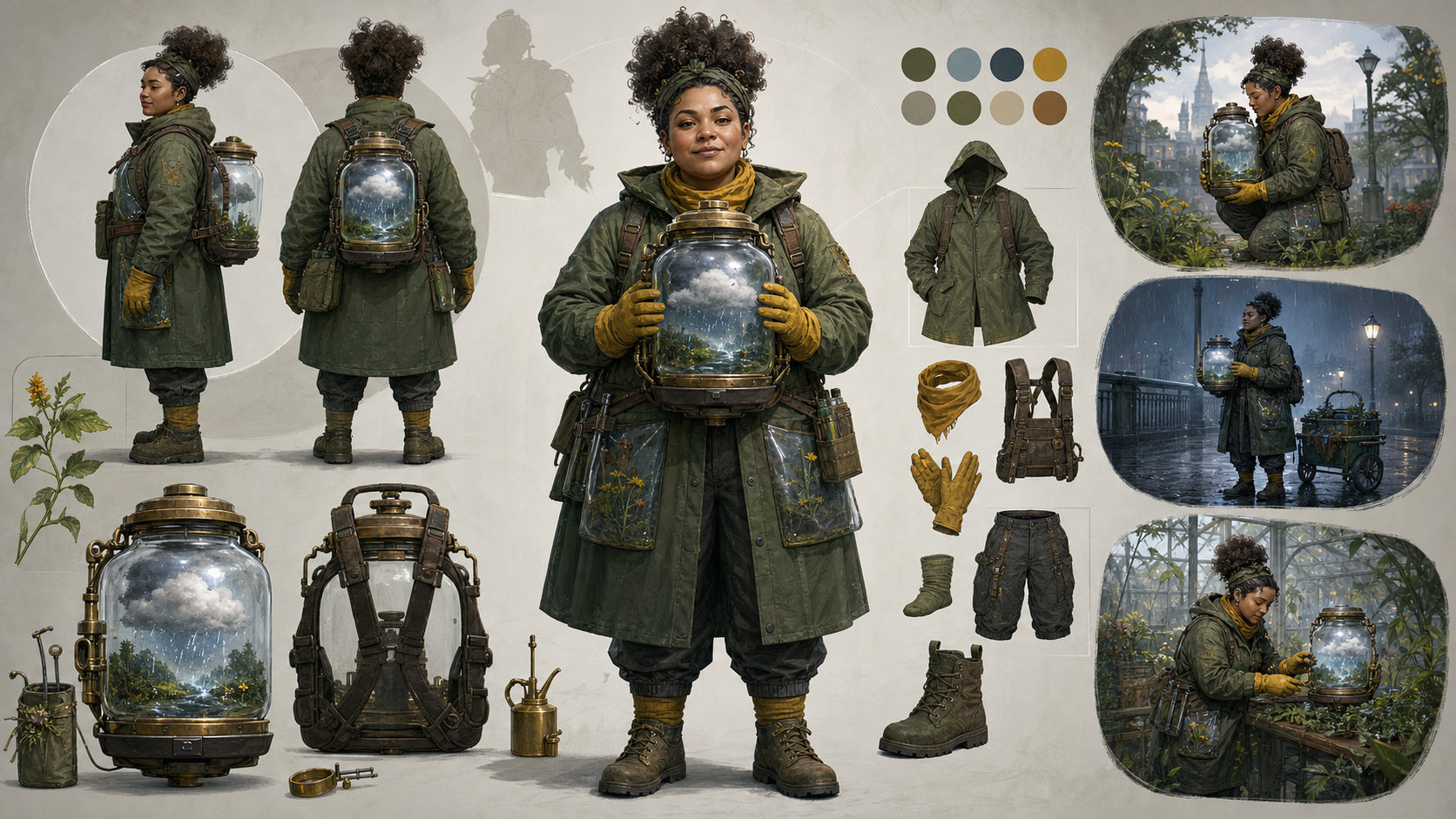
This article does not rank products or guarantee a winner for 2026. It provides a goal-based test that you can run yourself. The method evaluates identity control, reuse, range, editing, portability, rights clarity, and the real cost of reaching an accepted design. It also develops one complete sample OC—a municipal gardener in her thirties who grows miniature weather inside glass jars—so every tool is judged against the same character rather than different promotional examples.
You do not need drawing skills to start this process. You do need direction, selection, revision, and a clear understanding of rights. An image generator can propose a face and outfit; it cannot decide why the character deserves a story.
First Choose the Destination
Write the intended output before opening a generator: social avatar, reference sheet, roleplay profile, webtoon cast, visual novel, game concept, animated short, or 3D production asset. Different tool categories solve different problems.
1. Avatar Makers
Menu-based avatar makers let you select hair, eyes, clothing, colors, and accessories from a fixed library. They are usually fast and easy to understand. Because every option comes from a controlled asset set, the character can remain visually stable across exports from that system.
The trade-off is range. Two users may choose the same face or outfit, unusual professions may lack the right props, and silhouette options are limited to what the library provides. This category is a strong fit for a profile image or simple roleplay identity, but it may not express a highly specific character engine.
2. Text-to-Image Character Exploration
Text-to-image systems offer broad visual freedom. A prompt can combine an uncommon profession, body shape, material, prop, age, setting, and palette without waiting for a matching menu item. That makes them useful for discovering silhouettes and art directions.
The challenge is repeatability. The same character may return with a different face, coat construction, age, body proportion, or prop. A beautiful first image is not enough if the tool cannot help you establish a stable reference. Evaluate this category by what survives the second, fifth, and tenth image—not only the first.
3. Character-Sheet Workflows
A character-sheet workflow focuses on multiple views, expressions, poses, costume construction, and prop details. It treats the OC as a production asset rather than a portrait.
This category is valuable for comics, storyboards, visual novels, and animation because later scenes depend on reference reuse. Inspect whether front, side, and back views agree. Some tools produce an impressive combined sheet with contradictory pockets, hair, or hands, so separate generations and manual assembly may be more dependable.
4. Story and Animation Workflows
Story-oriented systems connect a character to scenes, scripts, panels, or motion. The important test is not whether the product advertises “story,” but whether the approved design can be carried into new contexts without losing identity.
Look for export quality, reference support, scene-to-scene control, and an editing path. Do not assume a platform has persistent character memory, dedicated OC templates, or one-click comic production unless its current documentation and your own test confirm those capabilities.
5. 3D Character Workflows
Games and 3D animation need more than a compelling image. A production-ready 3D character may require clean topology, UVs, textures, a skeleton, rigging, facial controls, collision, animation compatibility, and performance appropriate to the target platform.
A 2D concept generator can help define the design, but it does not automatically solve those technical requirements. If the final destination is real-time 3D, choose tools based on export formats, editability, rig quality, and engine fit rather than anime rendering alone.
The Six-Part OC Quality Test
Test every candidate tool with the same written brief and score these six dimensions.
1. Identity Control
Can you define facial structure, apparent adult age, body proportion, hair construction, silhouette, palette, and signature prop? Can you specify which details must not drift? A tool that offers only broad adjectives such as “beautiful” or “cool” gives less control than one that accepts structural direction.
2. Reference Reuse
Can the approved character appear again in a new pose, outfit, location, or emotion? Does the workflow accept your authorized reference, seed, project asset, or other consistency mechanism? The result should resemble the same person, not a cousin wearing similar colors.
3. Design Range
Can the system move beyond one fashionable default? Test different adult ages, body types, occupations, silhouettes, clothing functions, and emotional tones. Range is not the number of decorative styles; it is the ability to support different character concepts without flattening them into the same face.
4. Editing and Repair
Can you correct one problem without restarting everything? Useful repair tasks include changing a glove, closing a coat, fixing a jar attachment, simplifying hair, or restoring an approved face. Local control reduces waste and protects decisions already made.
5. Story Portability
Can the character leave the tool and remain usable? Export one image, open it elsewhere, and check resolution, transparency, color, crop, file format, and reference value. Then attempt a work scene, conversation, and failure scene. Portability is proven by reuse, not by a product category label.
6. Rights Clarity
Can you find current terms for uploads, outputs, privacy, retention, and commercial use? Are restrictions understandable? Does the tool explain what happens to references you provide? Ambiguity is a workflow cost, especially for a commercial project.
Calculate Cost per Accepted Design
Do not compare only the price of one generation. Track the total cost required to reach a character you would actually use:
accepted-design cost = generation credits + subscription share + editing time + rejected attempts + export or upscaling costs + rights-review effort
A low-cost image is expensive if twenty near-identical generic faces must be discarded. A higher-cost workflow may be more efficient if it preserves the approved identity and repairs individual details. Record both money and time.
Build the Character Before Testing the Maker
A fair comparison needs a character engine, not a loose style request. Use this complete sample:
A clearly adult municipal gardener in her mid-thirties secretly cultivates tiny weather systems inside glass jars.
Now define the forces that create scenes.
Want: She wants the city to grant her permission to restore an abandoned public greenhouse.
Fear: She is afraid that a contained storm will escape and injure someone, proving that the inspectors were right to reject her work.
Contradiction: She can wait patiently for a seedling to recover but loses patience quickly with people and committees.
Limitation: A weather jar remains stable only while she can remember the exact conditions stored inside it. Fatigue, stress, or a fading memory changes the weather.
These four decisions do more than add biography. The want creates an institutional obstacle. The fear gives the power stakes. The contradiction shapes dialogue. The limitation turns memory into visual danger. They provide a consistent test for images, poses, scenes, and voice.
Define the Visual Anchors
The design should show occupation and story before it shows decoration. Lock these anchors:
- clearly adult woman, approximately mid-thirties;
- short, sturdy body proportion suited to physical work;
- broad oval face with pale gray eyes;
- tightly curled dark hair gathered into a high puff;
- moss-green municipal utility coat;
- transparent weatherproof pockets built into the coat;
- yellow rubber gloves clipped to the belt;
- padded chest harness designed to secure one glass jar; and
- a miniature cloud visibly contained inside that jar.
The transparent pockets and harness come from her job. The yellow gloves create a readable color accent. The cloud jar is a story mechanism rather than a random magical accessory. Large, functional decisions make the silhouette easier to reproduce than a dense collection of belts and charms.
Add only a few secondary details after the anchors work. A city-issued patch should be abstract and unbranded. Dirt, temporary tools, and different weather can vary by scene. The base coat construction, body proportion, hair mass, and harness should not.
Generate and Inspect a Neutral Base
Begin with a production-oriented prompt rather than dramatic action:
Full-body original anime character, clearly adult municipal gardener in her mid-thirties, short sturdy silhouette, broad oval face, pale gray eyes, high puff of tightly curled dark hair, practical moss-green utility coat with coherent transparent weatherproof pockets, yellow rubber gloves clipped to belt, padded chest harness safely holding one glass jar containing a miniature cloud; neutral three-quarter standing pose, plain light background, even studio lighting, practical garment construction, clean line art, no text, no logo, no existing character.
If you use DeepFake for this visual exploration, text-to-image can draft an original neutral direction from the brief. DeepFake is not a dedicated OC-maker system, and this route does not promise persistent character memory, specialized OC templates, or automatic story production.
Choose the base for design logic, not polish. Check:
- Is her apparent age clearly adult and stable?
- Is the face identifiable without the hair, coat, or jar?
- Can she bend, kneel, lift, and work in the clothing?
- Is the glass jar attached securely enough for movement?
- Do the transparent pockets have a coherent construction?
- Does the short, sturdy silhouette read at thumbnail size?
- Are hands, harness straps, and garment seams plausible?
- Did the output introduce text, logos, or a familiar protected design?
Do not ask for an action scene until these questions have acceptable answers. Lighting, motion, effects, and camera angle can disguise a weak base.
Test Originality by Subtraction
Mentally remove “beautiful,” unusual eye color, fashionable accessories, and the fantasy setting. Does a person remain? In this sample, the civic goal, impatient social behavior, weather-memory limitation, coat function, and jar work still create identity.
Search the proposed name and central combination before publishing. If you find accidental overlap, revise more than color. Change profession, silhouette, prop logic, limitation, or relationship to the world. Describe line quality, material, lighting, era, and shape language instead of naming a living artist as a style shortcut.
Build a 10-Item Character Sheet
Once the neutral base is approved, create exactly the references production will need.
- Neutral portrait: even light, relaxed expression, clear face construction.
- Full-body front and side: consistent body proportion, coat length, pockets, and harness.
- Back view: hair volume, coat seams, harness attachment, and rear pocket construction.
- Five-expression set: focused, impatient, relieved, afraid, and quietly delighted.
- Hands-and-jar study: bare and gloved hands gripping, opening, and stabilizing the prop.
- Work pose: transferring rain between two jars while keeping the harness balanced.
- Casual outfit: an off-duty design that preserves face, body, hair, and character logic.
- Palette reference: flat swatches for skin, hair, coat, gloves, glass, and weather light.
- Prop detail: jar closure, padding, warning cue, and a simple cross-section of the contained cloud.
- Simplified wide-shot model: fewer details and larger shapes for distant comic panels or storyboards.
This sheet is more valuable than ten unrelated cinematic portraits. Generate views separately if one combined sheet changes the face, swaps pocket positions, or invents multiple harnesses. Assemble approved views manually when necessary.
An image-to-image workflow can help explore controlled revisions of artwork you created or have permission to modify. It does not make an unauthorized reference lawful and does not guarantee that identity will remain fixed. Compare every result against the approved base.
Write “Must Keep” and “May Vary” Rules
Consistency does not mean freezing every pixel. Separate identity anchors from scene-dependent details.
Must keep
- clearly adult face and mid-thirties age cues;
- short, sturdy proportions;
- high puff of tightly curled dark hair;
- moss-green coat construction;
- transparent weatherproof pocket material;
- padded chest harness; and
- one primary glass weather jar.
May vary
- rain, fog, snow, wind, or lightning inside the jar;
- gloves worn, clipped, or temporarily set beside her;
- coat open or closed when construction remains recognizable;
- dirt, moisture, and signs of a specific job; and
- temporary gardening tools appropriate to the scene.
Write these rules into every scene brief. If a variation changes a must-keep anchor, treat it as a failed identity test even when the image looks appealing.
Test the OC in Three Story Scenes
A reusable character must survive action, dialogue, and failure.
Scene 1: Work
She transfers rain from one jar to another while measuring droplets against a thirsty seed bed. This tests hand anatomy, prop scale, coat mobility, pocket placement, and whether the power has understandable physical steps.
The scene should make the occupation clear without explanatory text. If the harness prevents her from reaching the jars or the coat hides every action, revise the costume.
Scene 2: Conversation
She argues with a municipal inspector while preventing the cloud jar from shaking. This tests facial identity under emotion, the patient-with-plants/impatient-with-people contradiction, and simultaneous prop continuity.
Her posture can become rigid and her sentences short, but the face should remain the same adult person. The inspector should be an original supporting character, not a copied franchise authority figure.
Scene 3: Failure
Her memory of a thunderstorm starts to fade, and lightning inside the jar becomes unstable. This tests the limitation, fear, lighting on the face, and visual storytelling under pressure.
Do not solve the scene by granting a new power. Let her choose between admitting uncertainty, releasing the storm safely, or asking the inspector for help. A limitation is useful when it changes behavior.
If a tool can preserve identity only in a neutral pose, it fails story portability. If the jar solves every scene without cost, the character design—not the generator—needs revision.
Compare Two OC Maker Workflows With Nine Measurements
Choose two tools from categories that plausibly serve your destination. Run the same character engine, neutral prompt, visual anchors, must-keep list, and three scene tests. Keep image count, aspect ratio, and resolution as comparable as the tools allow.
Record nine measurements:
- Time to first accepted neutral design: not first output, but first one that passes the base check.
- Diversity across four options: meaningful silhouette and interpretation range, not palette swaps.
- Face and outfit consistency: stability across neutral views and scenes.
- Success in all three story tests: work, conversation, and failure.
- Character-sheet quality: agreement among front, side, back, hands, expressions, and prop.
- Repair options: ability to change one detail without losing approved decisions.
- Export quality: resolution, transparency, color, crop, format, and usefulness elsewhere.
- Total accepted-design cost: credits, subscription share, failed attempts, edits, and time.
- Rights and privacy documentation: clarity of input, output, retention, and commercial terms.
Use a short evidence note for every score. “Consistency: 4/5” is less useful than “face stayed stable in two scenes, but coat pockets swapped in the back view.” A good comparison reveals the failure mode you can tolerate.
The best choice follows the destination. A fixed avatar maker may beat a generative system for one profile image. A sheet workflow may justify more effort for a webtoon cast. A real 3D creator may be mandatory for an engine-ready model. There is no honest winner without a defined job.
Give the Character a Voice Without Copying One
Voice begins with writing rules, not audio generation. Give the gardener three rules:
- She uses exact weather vocabulary but vague words for her own emotions.
- She never says “maybe” when discussing plant care.
- Her sentences become shorter as anxiety increases.
A short dialogue can test those rules:
Inspector: “Is that storm authorized?”
Gardener: “The pressure is stable.”
Inspector: “That was not the question.”
Gardener: “It was the answer that keeps us dry.”
The language reveals expertise, deflection, and impatience without borrowing a known character’s catchphrase.
If you create a speaking presentation, use a licensed synthetic voice or a performer who has knowingly agreed to the intended use. Never clone an actor, creator, acquaintance, or private person deceptively. Permission should cover the actual project, distribution, duration, and editing—not merely access to a recording.
DeepFake’s AI Avatar route may be evaluated as a separate presentation workflow, but it is not proof of an OC-specific voice system, persistent character memory, or one-click animation continuity. Use only authorized identity and voice assets, clearly label synthetic media when appropriate, and review the result for consent, context, and audience safety.
Rights, Originality, and Fan-Inspired Work
AI assistance does not guarantee that a design is legally original. Generated combinations can resemble existing characters accidentally. Search the name, profession, silhouette, signature prop, palette, and core premise. Revise meaningful structure when overlap appears.
Only upload references you created or have permission to use. Do not use a living artist’s exact style as the main instruction. Do not assume a service accepting an input means the input is licensed. Keep prompts, selected outputs, edits, redraws, and rejection notes as part of the creative record.
For commercial plans, review:
- the tool’s current input and output terms;
- licenses for every reference, font, texture, and voice;
- privacy and retention policies;
- whether human selection and editing are documented;
- similarity to protected characters or brands; and
- rules in the countries where the work will be used.
This is a general checklist, not a legal opinion or guarantee of commercial rights. Laws and contract terms vary. Seek qualified legal advice when a project carries meaningful financial or reputational risk.
If the OC is intentionally fan-inspired, label it unofficial. Do not use official logos, copy a recognizable costume, claim canonical relationships, imitate an update announcement, or reuse protected models, music, voices, maps, or interface assets. An original individual placed inside someone else’s protected universe is not automatically an independent commercial property.
Real people require separate care. Obtain informed permission before using a face, voice, name, or distinctive likeness. Do not create deceptive impersonation, non-consensual sexual content, harassment, or misleading political media.
Export Before You Commit to a Tool
Create one accepted character, export it, and reopen it in the software used for the next stage. Check:
- pixel dimensions and print suitability;
- transparent-background quality;
- color shifts and embedded profiles;
- cropping and room for captions or panels;
- layer availability where promised;
- whether the file can be edited or only viewed; and
- whether the usage terms fit the intended project.
An OC maker is beginner-friendly only when the character can leave the generator and remain useful. A proprietary preview that cannot become a reference sheet, panel asset, game concept, or presentation input may be the wrong destination even if it is easy to create.
Frequently Asked Questions
What is the best OC maker for beginners in 2026?
There is no evidence-based universal winner in this article. A beginner making one profile picture may prefer a structured avatar maker. Someone building a recurring comic cast needs reference reuse, repair tools, and strong exports. Define the destination, then run the six-part test and compare accepted-design cost.
Can I create an OC without drawing?
Yes. Menu-based, text-based, and authorized reference-based workflows can produce visual drafts. You still provide the character engine, select results, correct errors, check originality, and document decisions. Not drawing does not mean not designing.
How do I make an AI-assisted OC less generic?
Start with a want, fear, contradiction, limitation, occupation, and relationship. Make visual details serve those choices. Limit the number of anchors, remove fashionable filler, and test the character in action, conversation, and failure.
How many images should I generate before choosing?
There is no ideal number. Generate a small comparable set, reject outputs against written criteria, and track total cost. Stop when a design passes the neutral checks—not when you become tired of browsing variations.
Can I sell my AI-assisted OC?
Commercial use depends on tool terms, input licenses, local law, human contribution, similarity to existing works, and the surrounding project. This article cannot guarantee that an output is protected or clear to sell. Review the full rights chain and obtain legal advice when needed.
Can I use a copyrighted character as a reference?
Do not assume you can. A safer workflow starts from original written traits, functional clothing, silhouette, materials, and mood. Upload only art you own or are licensed to modify, and follow applicable fan-content and platform policies.
What if the face changes in every scene?
Return to the neutral base. Reduce decorative details, strengthen structural face notes, lock three to five anchors, and vary only one condition at a time. If the tool still cannot reuse the reference reliably, choose another workflow or plan for manual correction.
Do I need a character sheet for a single avatar?
Probably not. A character sheet is valuable when the OC will recur in panels, scenes, poses, outfits, or 3D development. Match the production investment to the destination.
Conclusion
“Best” should describe fit, not hype. An OC maker earns that label when it supports the character’s destination, preserves identity, allows repair, exports useful references, documents rights clearly, and reaches an accepted design at a reasonable total cost.
Build the person before generating the portrait. Give the OC a want, fear, contradiction, and limitation. Lock a small set of functional visual anchors, approve a neutral base, create a 10-item sheet, and test work, conversation, and failure. Then compare two tools with the same nine measurements.
Drawing is only one way to design. Careful writing, selection, editing, consent, and rights review are also creative work. Those decisions are what turn a generated face into a character who can carry a story.