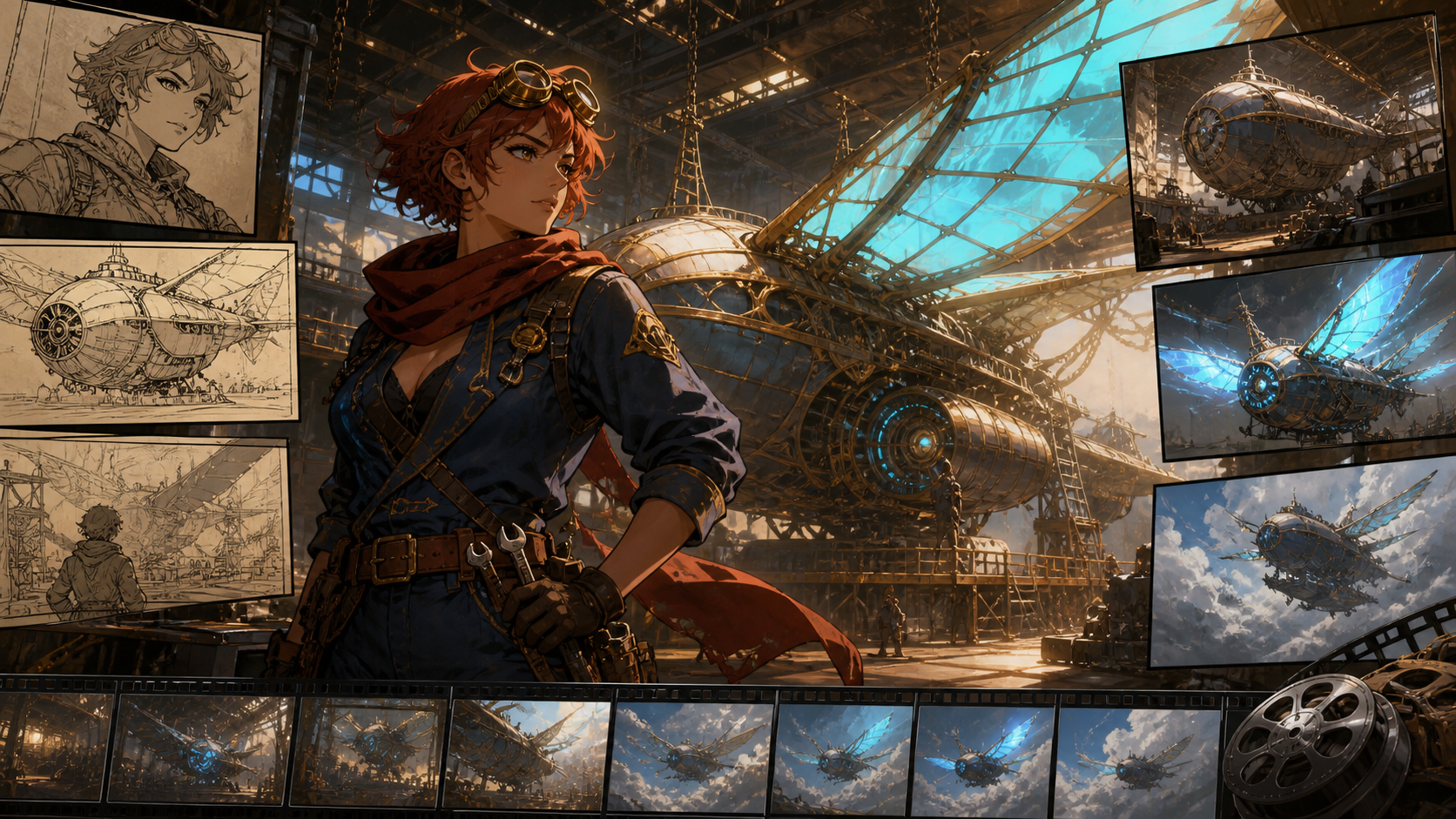
The fastest way to waste AI video credits is to open a generator before deciding what the scene is for. The button is not the expensive part. Unclear characters, conflicting references, missing shots, and weak edit plans are what turn repeated generations into unusable footage.
A production-ready anime workflow starts upstream. Define the audience and story beat, design the character as a reusable asset, map each shot, and assign a clear job to every reference. Only then should a video model create motion. After generation, editing—not model prestige—turns the shots into one coherent experience.
Seedance 2.5's official landing page now says the model is live worldwide and advertises 30-second video, up to 50 multimodal references, 4K-oriented output, and precise editing. Those are current first-party claims, not guaranteed performance in every project. Account access, region, credits, controls, and actual output options can still differ, so verify them in the workspace before planning a production.
The workflow remains useful if Seedance 2.5 is not yet visible in your account. You can complete the brief, character pack, storyboard, and reference hierarchy now, then test the motion stage with whichever model you can access.
The Pipeline in One View
A reliable anime short moves through seven stages:
- Write a production brief.
- Build a reusable original character pack.
- Convert the script into a shot map.
- Assign specific responsibilities to references and prompts.
- Generate and review in risk order.
- Edit picture and sound for rhythm.
- Add typography, branding, captions, and disclosure after generation.
Each stage removes ambiguity before it becomes an expensive moving problem.
Stage 1: Write a Production Brief, Not One Giant Prompt
Begin with five decisions:
- Audience: Who is the short for?
- Format: Which platform and aspect ratio will receive it?
- Length: What is the target runtime?
- Emotion: What single feeling should change or intensify?
- Final action: What must the viewer see before the piece ends?
For example:
A 35-second vertical anime teaser for fantasy-adventure fans. An adult mechanic discovers that a forgotten skyship is still alive. The emotion moves from careful curiosity to awe. End when the vessel unfolds luminous wings above the hangar.
This brief already decides several things. The mechanic must remain large enough to read on a phone. The reveal needs a wide shot. The story probably needs five or six concise shots, not one uninterrupted generation. Dialogue is optional because the emotional change can be shown through action and sound.
Turn the brief into a beat sheet:
- Hook: an unexpected cyan pulse in a dark hangar.
- Discovery: the mechanic approaches the dormant control crystal.
- Contact: dust moves as her hand reaches the surface.
- Reaction: light reflects across her face and goggles.
- Reveal: the skyship opens its wings.
- Ending: the mechanic watches as the vessel rises.
Read the planned voiceover aloud with a timer. If speech consumes the entire target runtime, the images have no room to communicate. Anime timing needs pauses, anticipation, reaction, and impact.
Stage 2: Design the Character as a Production Asset
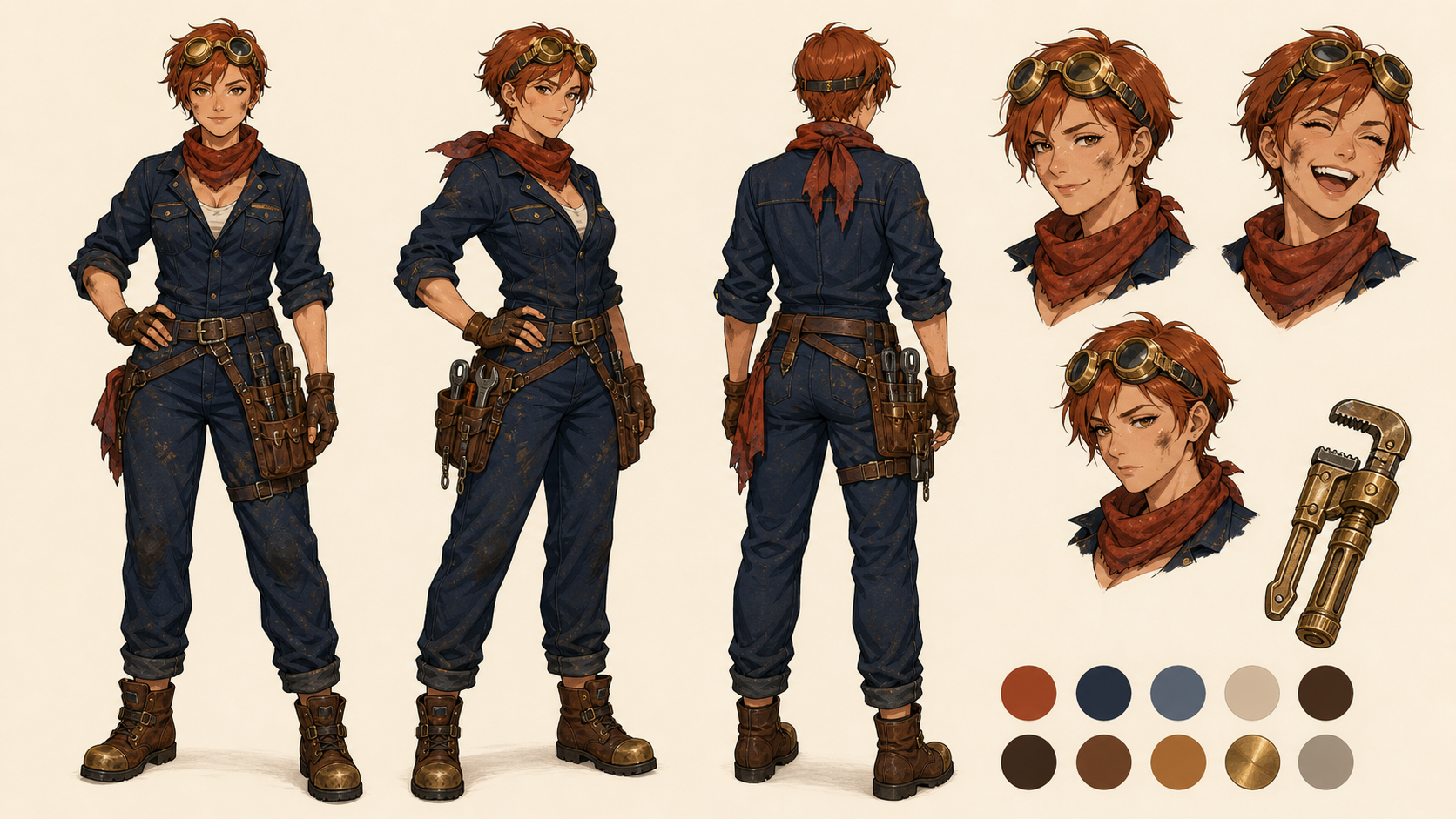
A pleasing hero image is not yet an animation-ready character. Create an original identity with a silhouette and details that survive motion.
You can explore the initial design in a text-to-image workflow. Once you choose a direction, build a compact production pack:
- identity portrait;
- full-body neutral pose;
- front, three-quarter, and rear costume views;
- three essential expressions;
- prop sheet;
- unlabeled visual palette plus written color specifications.
For the example mechanic, the stable anchors might be short copper hair, a rust-red scarf, midnight-blue coveralls, brass goggles, an asymmetric tool belt, and a worn mechanical wrench. Record those terms in the project notes. “Keep it the same” is not auditable; named colors and objects are.
Simplify details that will be difficult to reproduce frame after frame. A clear scarf shape and bold goggle silhouette are stronger anchors than dense filigree across every seam. Make sure the character is clearly adult and entirely original. Do not build around a celebrity likeness, a recognizable copyrighted costume, or an existing franchise character.
Apply the same discipline to recurring objects. Draw the skyship from front, side, and three-quarter views. Decide how many wings, engines, windows, and fins it has. If the storyboard shows three engines while the reference sheet shows four, the video model receives a contradiction before it generates anything.
Stage 3: Turn the Script Into a Shot Map
A storyboard should function as a contract, not decoration. Every row needs one story job, one primary action, and one reviewable outcome.
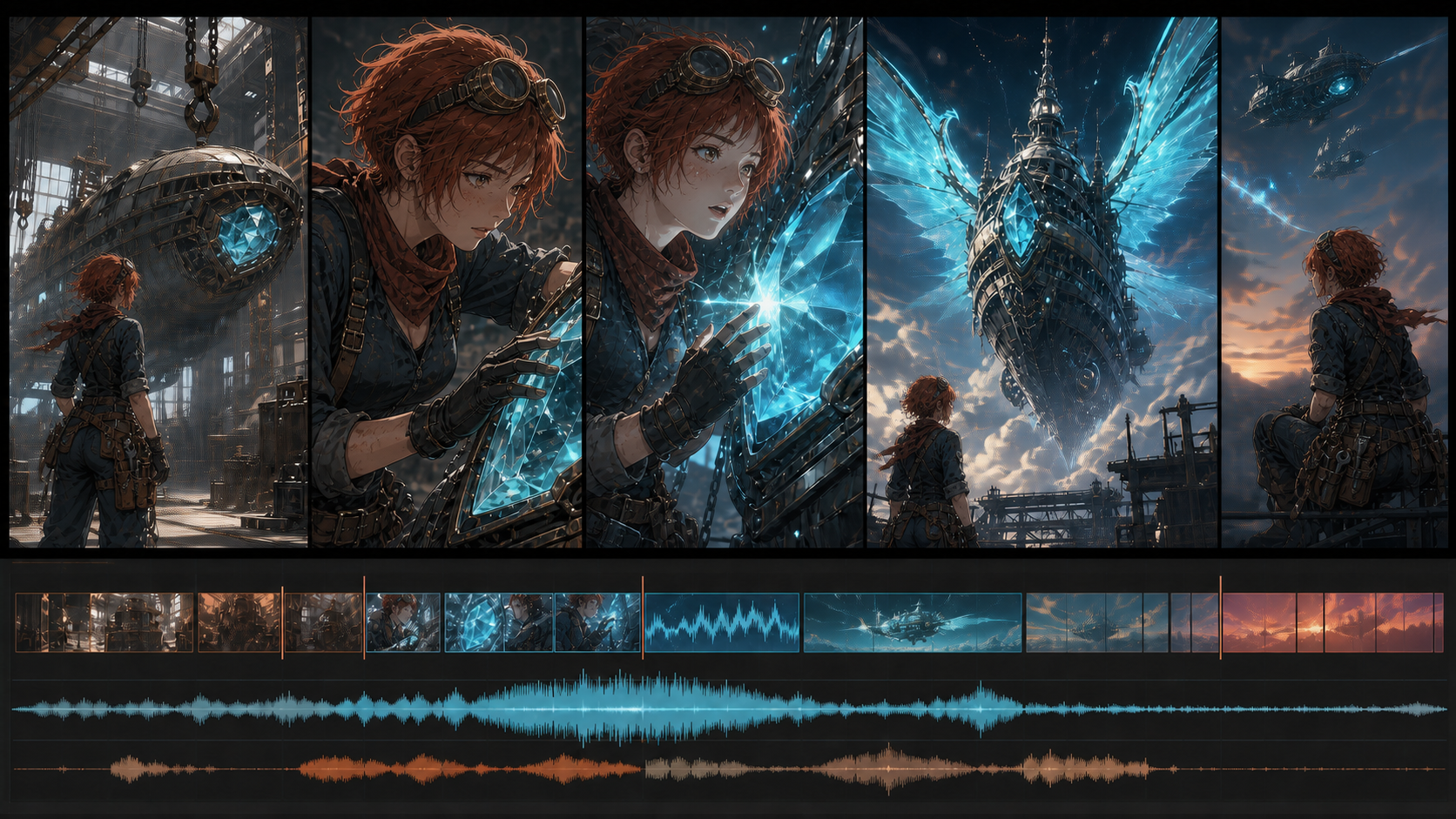
Here is a practical map for the skyship teaser:
| Shot | Story job | Framing and motion | Target length | Main risk |
|---|---|---|---|---|
| 1 | Hook with unexplained energy | Wide hangar, slow push toward cyan pulse | 4s | Scale and atmosphere |
| 2 | Introduce the mechanic's choice | Medium shot, she approaches and kneels | 5s | Character and hand continuity |
| 3 | Confirm contact | Close insert, gloved hand brushes crystal | 4s | Finger-object interaction |
| 4 | Show emotional change | Close-up, light grows across her face | 5s | Identity and expression |
| 5 | Deliver the reveal | Wide orbit as wings unfold | 8s | Complex geometry and camera path |
| 6 | Resolve the beat | Rear silhouette as ship rises | 5s | Clean edit and final composition |
The lengths are planning targets, not a demand that one model generate the complete piece. Adjust them after testing.
Create a clean opening frame for every shot with the same character and object references. Compose it close to the desired first video frame because image-to-video methods often inherit placement and crop. Leave visual space in the ending frame if a title or call to action will appear later.
Design separately for 16:9 and 9:16 when both are required. Cropping a wide action scene into vertical format can remove the character or the object that makes the action understandable. The cost of a second composition is usually lower than repairing a compromised final edit.
Stage 4: Give Every Seedance Reference One Job
Seedance 2.5's official page promotes a large multimodal reference capacity, but maximum capacity is not a creative goal. More inputs can create more conflict unless their responsibilities are explicit.
Assign roles:
- Identity portrait: face, hair, and age.
- Full-body sheet: proportions, costume, and accessories.
- Opening frame: composition, set, camera height, and initial pose.
- End frame: visual destination when endpoint control is available.
- Object sheet: skyship geometry and crystal design.
- Motion reference: timing and body mechanics, only when licensed and supported.
- Audio reference: rhythm, voice, or performance cue, only with permission.
- Prompt: visible action, camera behavior, lighting change, sound intent, and constraints.
Begin with the minimum package that answers identity, setting, and action. Add a reference only when it resolves a specific ambiguity.
A structured anime motion prompt
For the second shot, a production prompt could be:
Preserve the original adult mechanic's short copper hair, rust-red scarf, midnight-blue coveralls, brass goggles, facial structure, and body proportions from the character references. Begin from the supplied hangar frame. She kneels beside the dormant control crystal and brushes dust from its surface with her right glove. The crystal emits one soft cyan pulse; she stops and looks upward with cautious wonder. Six-second slow dolly from medium shot to medium close-up. Dust drifts through one warm window beam. Stable costume, stable face, one character, no dialogue, no text, no cut.
This format works because it is a directing brief. It names continuity, starting composition, visible action, reaction, camera, duration, atmosphere, and failure constraints. Adjectives such as “epic” or “masterpiece” add less control than a precise verb and camera path.
If exact continuity matters and your available model accepts a still, begin with an image-to-video workflow. Text-to-video is more useful for exploratory environments, abstract transitions, or early concept motion where exact character design is not yet fixed.
Stage 5: Generate in Risk Order
Do not automatically render from Shot 1 to Shot 6. Start with the shot most likely to break the project. Here, that is the wing reveal: it combines a large mechanical object, geometry change, camera orbit, lighting effect, and the character's reaction.
If the model cannot execute the reveal within the available budget, learn that before polishing every setup shot. You can redesign the shot as three easier pieces: crystal activation, close-up of mechanisms unlocking, and a wide silhouette of already-open wings.
For every generation, review:
- narrative clarity with sound muted;
- identity at the first, middle, and last frames;
- hair, scarf, goggles, and tool-belt continuity;
- hands and crystal contact;
- wing, engine, and fin count;
- camera direction and speed;
- lighting source and shadow direction;
- unwanted symbols or pseudo-text;
- clean entrance and exit frames for editing;
- audio relevance, synchronization, and artifacts.
Keep an asset log with shot ID, prompt version, references, model, settings, date, output filename, review notes, and approval status. A great clip is difficult to reproduce if the production trail ends in browser history.
Retry by diagnosis
When a take fails, identify the subsystem:
| Failure | Likely cause | Next controlled test |
|---|---|---|
| Face changes during a turn | Weak identity frame or excessive rotation | Use a three-quarter reference and reduce the head turn |
| Scarf or goggles disappear | Too much motion or unclear costume sheet | Strengthen the full-body reference and simplify camera movement |
| Hand melts into crystal | Complex contact and occlusion | Use an insert shot with a slower approach and clearer hand pose |
| Skyship geometry mutates | Conflicting object views or long transformation | Lock one view and split the reveal into separate shots |
| Camera ignores the orbit | Too many competing actions | Reduce environmental motion and prioritize the camera command |
| Scene feels busy | Prompt gives every background object an action | Remove secondary instructions and preserve one focal event |
Change one variable per retry. Rewriting prompt, references, duration, camera, and style together prevents you from learning which change solved the problem.
Stage 6: Edit for Story Rhythm
Selected clips return to a conventional editor or animation timeline. The audience does not care how many models contributed. They care whether the sequence is legible, emotionally paced, and pleasant to hear.
Build the silent cut first
Arrange shots without music or dialogue. Trim dead starts and endings. Protect the mechanic's reaction after the crystal pulse; cutting immediately to the ship may remove the emotional bridge. Cut on visible changes in action, direction, light, or scale.
If the story is unclear without sound, repair picture structure before adding a dramatic track. An insert of gears unlocking may explain the awakening better than louder effects.
Add voice with restraint
The teaser may need only one line, such as “You were waiting.” Record or synthesize clean audio with appropriate rights, then apply it to a controlled close-up using a lip-sync workflow. Keep the mouth visible and review facial identity through the entire phrase.
Do not force dialogue into the complex wing-reveal shot. Separating speech from large mechanical motion gives each generation a clearer task.
Build sound in layers
Use separate layers for dialogue, ambience, mechanical effects, impact accents, and music. The hangar might carry low wind, distant metal resonance, a crystalline pulse, locking gears, then an expanding tonal swell as the wings open.
Audio should clarify events, not disguise broken motion. Preserve editable stems and record the origin and license of every sound.
Stage 7: Add Text and Branding After Generation
Do not ask the video model to render an episode title, product name, disclaimer, or call to action. Generated text can change between frames and may resemble meaningless symbols.
Reserve negative space in the storyboard, then add typography during editing. For vertical output, keep essential text away from top and bottom interface zones and from right-side interaction controls. Check the final on an actual phone rather than trusting a desktop preview.
Add captions from the final audio, not from an early script. Review character names, invented place names, punctuation, timing, and line breaks manually. Burn in only the captions the delivery requires; keep a clean master when possible.
If realistic synthetic media could be mistaken for a real person, event, or endorsement, include clear disclosure. For a visibly stylized original anime film, disclose AI use according to the platform, client, festival, or campaign requirements.
A Sensible Project Setup
Create the project structure before generations spread across downloads:
anime-short/
  01-brief-script/
  02-character-pack/
  03-object-location-references/
  04-storyboards/
  05-generations/shot-01 ... shot-06/
  06-audio/
  07-edit/
  08-exports/
  asset-log.csv
Use filenames such as s04_reveal_prompt-v03_take-02_approved. Keep local copies of approved references and final outputs even when a cloud workspace stores the project. Model availability and account access can change.
Before relying on Seedance 2.5, check the official creator workspace for current access. Although the public landing page now says the model is live worldwide, a marketing availability statement is not proof that every account, region, or plan exposes the same controls.
Preflight Checklist Before the First Generation
Confirm:
- the brief names one audience, format, emotion, and final action;
- the character and ship are original and rights-cleared;
- the character pack uses stable colors and recognizable shapes;
- each storyboard frame has one story job;
- landscape and vertical versions are composed intentionally;
- every reference has a declared role;
- the hardest shot has a fallback design;
- voice, music, motion footage, and textures are licensed;
- output settings and access have been checked in the live account;
- the team knows what counts as an approved take.
Final Quality-Control Pass
Watch the completed anime short four ways:
- Muted: Does the story make sense visually?
- Audio only: Are dialogue, ambience, and effects intelligible and balanced?
- Frame by frame: Do identity, hands, props, ship geometry, and typography hold?
- On the target device: Are captions readable and is essential action visible after platform cropping?
Then check exports for aspect ratio, frame rate, color shifts, audio peaks, caption timing, compression, disclosure, and filename. A production workflow ends when the delivered file survives its destination—not when the generator finishes.
Frequently Asked Questions
Is Seedance 2.5 available now?
The official landing page now says Seedance 2.5 is live worldwide and offers a direct creation entry point. Sign in to the official workspace and check the model selector, credits, and available settings for your account before committing a production budget.
Can Seedance 2.5 generate a complete 30-second anime short in one pass?
The official page advertises 30-second generation, but a longer ceiling does not make one generation the best editorial choice. Separate shots give you clearer reference responsibilities, easier retries, more deliberate pacing, and replaceable failures.
How many shots should a 30-second anime video have?
Four to seven purposeful shots are a useful starting range, not a rule. An action montage may need more, while an emotional close-up may need fewer. Choose shots according to story function.
Should I use text-to-video or image-to-video for anime?
Use image-to-video when character design, costume, object geometry, and composition must remain recognizable. Use text-to-video for visual exploration, environments, transitions, and ideas where continuity is not yet locked.
Should I upload all 50 possible references?
No. The official page advertises support for up to 50 multimodal references, but a smaller, well-labeled set is usually easier to direct. Add inputs only when each one has a clear responsibility and does not contradict the rest.
What should I do if the hardest shot fails?
Reduce simultaneous demands. Split the action, simplify the camera, use a clearer object sheet, or reveal the result across an insert and a wide shot. Design the edit around reliable pieces instead of forcing one expensive take.
Is this anime workflow suitable for client work?
It can be, provided you verify current terms, license every input, avoid unauthorized likenesses and protected characters, document prompts and approvals, disclose limitations, and agree on how revisions and unusable generations affect budget and schedule.
Safety and Originality
Create original characters and worlds. Do not imitate a living artist's exact style, reuse protected franchise designs, or animate a real person's likeness or voice without explicit permission. Reference footage must also be created, licensed, or otherwise authorized for the intended use.
For client work, document the origin of character art, props, textures, fonts, music, effects, voice, and motion references. Confirm commercial terms for every service used. A coherent rights record is as important to a publishable production as a coherent face.
Final Takeaway
A Seedance 2.5 anime workflow succeeds when generation is one controlled stage inside a larger editorial system. Start with a five-line brief. Lock the character and object design. Map one job per shot. Give each multimodal input a responsibility. Test the riskiest scene first, diagnose failures one variable at a time, and preserve a complete asset log.
Then let editing do its work: keep the clean frames, protect reactions, rebuild weak audio, add text with proper typography, and deliver for the actual screen. The competitive advantage is not producing the most footage. It is reaching a confident, publishable decision with fewer blind retries.