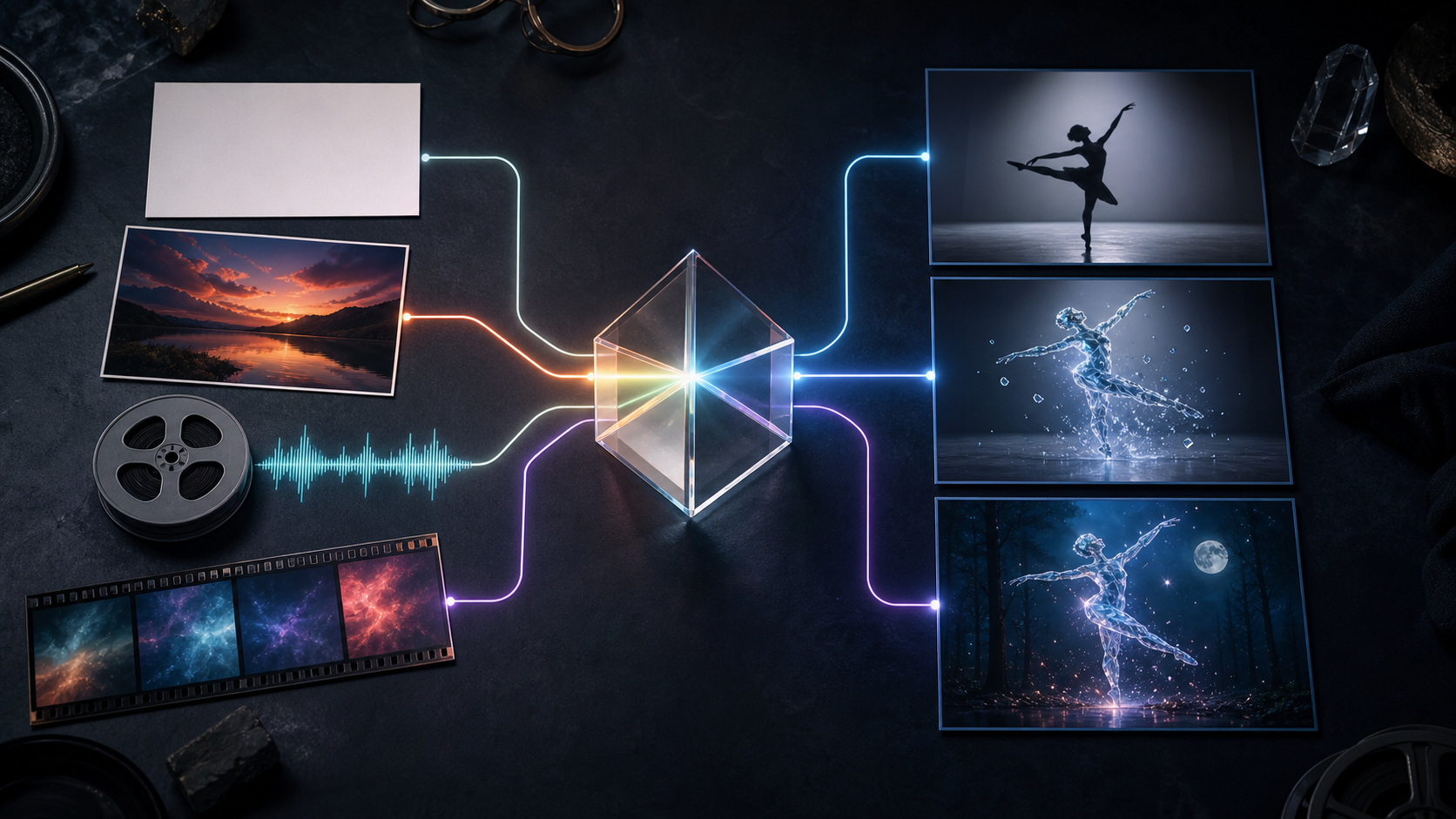
Google introduced Gemini Omni at I/O 2026 as a multimodal creative-model family designed to create from combinations of text, images, audio, and video. The first member is Gemini Omni Flash, a preview model centered on video generation and editing.
The announcement's broad phrase—create anything from anything—is a direction for the family, not a claim that every input and output combination is already in production. The confirmed starting point is narrower and still substantial: Gemini Omni Flash can generate video from prompts and references, edit existing video through natural-language instructions, use several media types together, and refine a result over multiple conversational turns.
This guide consolidates the information creators need in August 2026. It covers release status, inputs, outputs, editing behavior, access, practical workflows, prompt patterns, quality control, safety, and the difference between documented capability and speculation.
Release Status at a Glance
| Question | Current answer |
|---|---|
| What is the first model? | Gemini Omni Flash |
| What is the developer model ID? | gemini-omni-flash-preview |
| Is it generally stable? | It is documented as preview; details can change |
| What can it accept? | Text, images, audio, and video in supported combinations |
| What does it output today? | Video is the current public focus |
| Can it edit video? | Yes, including conversational multi-turn editing |
| Where is it appearing? | Gemini, Flow, YouTube, Vids, AI Studio, API, and enterprise surfaces, with varying access |
| Are more output types planned? | Yes, but future modes should not be treated as available now |
Google's model pages and developer documentation are the authority for current availability. Subscription tier, geography, quota, feature surface, duration, and pricing can vary.
The Core Idea: One Scene, Many Kinds of Evidence
Most generation systems begin with a text prompt. Text is flexible, but it can be a poor substitute for the exact thing a creator wants. Describing a movement, voice rhythm, material, face, camera path, or visual style can require many words and still leave ambiguity.
Gemini Omni lets the creator provide the evidence directly:
- Text can define intention, sequence, constraints, and dialogue.
- An image can define identity, product shape, environment, composition, or style.
- Audio can define speech, ambience, music, or timing.
- Video can define motion, performance, camera, scene structure, or source content to edit.
The prompt explains how these sources relate. A model that receives several media types must decide which details to preserve, combine, transform, or ignore. Good direction makes those roles explicit.
Confirmed Capability Areas
Text-to-Video
Gemini Omni Flash can create a video from a written description. A production prompt should specify the scene, visible action, camera, timing, sound, and exclusions. Text-to-video offers the most creative freedom but the least visual anchoring.
Image-to-Video
A still image can anchor subject identity, layout, product shape, or art direction. The prompt then directs movement and sound. Start from a high-quality image without malformed details, unwanted text, or a crop that blocks the intended action.
The DeepFake image-to-video workflow can also help compare current models for this type of shot. Use representative source images rather than assuming one system will handle every style equally.
Video Editing
Gemini Omni can transform an existing video through natural language. Demonstrated tasks include changing aesthetics, actions, effects, objects, characters, environments, camera angles, and audio relationships. Editing may preserve much of the source, but it remains generative and must be checked outside the requested area.
Reference-to-Video
Mixed references can contribute separate properties to the result. A creator might use one image for a character, another for material, a video for motion, and audio for rhythm. This is one of the strongest reasons to choose a multimodal model.
Conversational Refinement
Through Google's Interactions API, a creator can build edits across turns. Instead of rewriting the full scene, they can request a bounded change to the current version. This supports branching exploration, provided the team saves approved parents and does not assume preservation is perfect.
World-Knowledge-Guided Creation
Google describes Gemini Omni as connecting generation with Gemini's knowledge of physics, history, science, culture, and narrative. It can use this context to make a scene more meaningful than a visual texture exercise. Expert review is still required for factual or high-stakes content.
Synchronized Text and Action
Official examples include text appearing in coordination with onscreen action. This is promising for motion graphics and educational clips, but important typography still needs frame-by-frame proofreading. Use conventional design tools when exact copy is mandatory.
What Remains Future Direction or Unverified
The following ideas should not be presented as current guarantees unless Google publishes a specific product update:
- A fully universal set of output modalities
- A particular “Pro” model or launch date
- A permanent duration ceiling that applies to every surface
- Guaranteed consistency through unlimited edits
- Exact quota consumption across subscriptions
- Universal best performance in one language
- A fixed internal combination of separate named models
- Automatic scientific accuracy
- Free access through every consumer product
Some may become true later or may appear in limited tests. A complete guide should preserve the distinction between an announced capability, a preview behavior, and an inferred roadmap.
Access and Availability
Google has placed or announced Gemini Omni capabilities across several surfaces.
Gemini App
The consumer app provides a conversational entry point for creation and editing. Availability depends on Google AI subscription, region, and rollout.
Google Flow
Flow is Google's creative video workspace and is a natural home for reference-driven generation and iterative scene development.
YouTube Surfaces
Google has discussed or deployed Omni across YouTube Shorts and related creation workflows. Platform-specific tools may simplify short-form publishing but may not expose the same controls as the developer API.
Google Vids
Vids uses Gemini Omni for workplace-oriented video generation and editing. Eligibility can differ between Google AI subscribers and Workspace customers.
Google AI Studio and Gemini API
Developers can experiment with gemini-omni-flash-preview. Preview integrations should include logging, retry handling, content-safety behavior, model-version tracking, cost monitoring, and regression tests.
Feature availability changes quickly. Check the current surface before promising a client a duration, format, input count, or delivery date.
Choose the Right Mode for the Job
| Creative need | Best starting input | Main benefit | Main risk |
|---|---|---|---|
| Invent a scene | Text | Maximum creative freedom | Low identity control |
| Animate approved art | Image + text | Strong first-frame anchor | Drift during motion |
| Restyle footage | Video + style reference | Preserves temporal structure | Unwanted source changes |
| Transfer performance | Motion video + character image | Direct motion evidence | Anatomy and identity errors |
| Cut to a beat | Video or image + audio | Timing reference | Busy or inaccurate sync |
| Revise a good clip | Existing result + edit instruction | Builds on approved work | Cascading changes |
| Create an explainer | Brief + factual sources + references | Topic-aware narrative | Convincing factual errors |
Model selection should be tied to the shot. Review the DeepFake model catalog when a production needs to compare reference support, speed, style, duration, or cost across systems.
Prompting Gemini Omni: The Input Contract
A multimodal prompt works like a contract between the supplied assets and the desired video. Include the following blocks.
1. Deliverable
State what is being made and where it will be used.
Create a horizontal eight-second product hero shot for a landing page.
2. Reference Roles
Name each input and assign one purpose.
Use Image A only for the product's geometry and material. Use Image B only for palette and lighting. Use Video A only for camera motion. Use Audio A as the final music track and timing reference.
3. Scene and Action
Describe visible events in chronological order.
The product begins in silhouette. A narrow warm light reveals its edge while condensation moves down the surface. At the sixth second, it completes a quarter turn and holds.
4. Camera and Edit Grammar
Specify framing, movement, and cuts.
One continuous macro-to-medium dolly backward, eye-level camera, no cuts, no orbit.
5. Audio
Connect audible events to visible actions.
Preserve the supplied music. Add one subtle mechanical click when the turn begins. No voice or additional effects.
6. Preservation
List details that must remain fixed.
Preserve product proportions, control placement, surface finish, and the exact left-to-right light direction.
7. Exclusions
State what must not appear.
No labels, text, logo, packaging, hands, extra products, interface elements, or camera shake.
Avoid contradictory references. If the source video shows a handheld camera but the prompt demands a locked tripod, say which takes priority.
Prompt Templates
Text-to-Video Scene
Create a twelve-second cinematic scene in a small coastal radio station during a storm. An adult operator in a yellow raincoat crosses the room, secures a rattling window, and listens as the emergency radio activates. Begin with a wide static frame, cut to a medium tracking view as the operator moves, then end on a close insert of the unbranded radio dial. Cold blue exterior light, warm desk lamp, realistic restrained motion. Wind, rain, a wooden rattle, and a low radio tone; no dialogue or music. Preserve room layout and wardrobe across all shots. No text, logos, or extra people.
Motion and Character Transfer
Use Video A only for the dancer's pose sequence and timing. Use Image A only for the fictional crystal character's appearance. Keep the plain studio and fixed camera from Video A. Transfer the full movement without showing the original performer. Preserve limb count, body proportions, floor contact, and reflection direction. Keep the original music unchanged. No text, added props, cuts, or background transformation.
Audio-Reactive Visual
Use Audio A as both soundtrack and timing reference. In the supplied night-city video, turn one row of apartment lights on at each strong beat, moving from lower left to upper right. Keep the camera, buildings, vehicles, sky, and clip duration unchanged. Lights should remain on after activation. Do not alter the audio or add text.
Conversational Edit
Starting from the current result, keep the character, motion, camera, dialogue, scene duration, wardrobe, and foreground unchanged. Replace only the background walls with a quiet greenhouse at night. Match the existing light direction and preserve the original floor contact and shadows. Do not add plants in front of the subject.
Production Playbook 1: Character-Driven Short
- Create and approve a character reference sheet.
- Write a short scene with one emotional change.
- Decide whether performance comes from text or a rights-cleared source video.
- Map costume, movement, environment, camera, and audio to specific inputs.
- Generate a conservative test with limited camera movement.
- Review face, hair, hands, clothing, props, floor contact, voice, and lip sync.
- Use conversational edits for one problem at a time.
- Create alternate coverage only after identity is stable.
- Assemble shots, mix audio, add captions, and export.
Production Playbook 2: Product Campaign
- Gather approved product images from useful angles.
- Identify exact details that cannot change.
- Keep legal text and final branding out of the generative layer.
- Test lighting and camera motion with a short silent clip.
- Add music or effects only after geometry passes review.
- Generate horizontal and vertical compositions separately.
- Composite exact labels, prices, and calls to action in post.
- Verify the final frame against the real product and campaign claims.
Production Playbook 3: Educational Explainer
- Write a fact-checked learning objective and script.
- Identify which visuals are literal and which are metaphors.
- Supply diagrams or reference material with valid rights.
- Use a prompt that states audience level, visual sequence, and narration.
- Generate short concept segments instead of one dense explanation.
- Have a qualified reviewer check narration and every scientific mechanism.
- Correct captions manually and add sources outside the generated picture.
- Test comprehension with viewers before publication.
Conversational Editing as Version Control
Treat each successful result as a node, not a disposable intermediate. A simple file structure can record:
- Parent asset ID
- Model and date
- Full input list
- Prompt and edit instruction
- Output settings and shown cost
- Protected elements
- Review notes
- Approval status
When an edit fails, branch from the last approved parent. Do not ask another generation to repair a change that already damaged identity or geometry unless that recovery is being tested deliberately.
A useful edit changes one category at a time: lighting, environment, object, camera, action, audio, or timing. This makes cause and effect visible.
Quality-Control Framework
Story
- Is the event understandable without explanation?
- Does every shot or transformation serve the objective?
- Is the ending deliberate rather than abruptly truncated?
Reference Adherence
- Does each input control the property it was assigned?
- Did conflicting features leak between references?
- Are character, product, and environment details stable?
Motion and Physics
- Are gravity, momentum, fluid, cloth, reflection, and contact plausible?
- Does the camera travel through a coherent space?
- Do objects keep shape and scale?
Audio
- Are music events synchronized as requested?
- Does dialogue belong to the correct speaker?
- Are effects timed to visible actions?
- Are there clipped words, unnatural pauses, or noisy transitions?
Editing
- Did a conversational change affect protected regions?
- Are frames near the edit boundary coherent?
- Can the output be cut cleanly with other shots?
Accuracy and Safety
- Are facts supported by reliable sources?
- Are all people, voices, music, and reference assets authorized?
- Does the video include necessary disclosure?
- Could the result mislead viewers about a real event?
Known Limitations
Preview Changes
The model and API may change. Automated workflows should detect model updates, log output differences, and maintain a rollback plan.
Continuity Errors
Faces, hands, objects, wardrobes, text, and backgrounds can drift, especially through complex transformations or repeated edits.
Composition and Geometry
Reference input improves control but does not guarantee exact placement. Structured layouts, architecture, product construction, and dense scenes require close inspection.
Factual Reliability
The model can create confident educational media that contains errors. Grounding and expert review remain necessary.
Access and Cost Variability
Different surfaces can expose different quotas, sizes, durations, and prices. Check current settings at generation time.
Not a Full Editor
Generative revision does not replace frame-accurate timing, manual masks, exact typography, controlled compositing, audio mixing, or delivery management.
For source footage that mainly needs a style transformation, compare the model with a dedicated video-to-video workflow. Specialized control may outperform a more general multimodal path for a particular shot.
Safety and Media Provenance
Google says supported Gemini, Flow, and YouTube outputs include imperceptible SynthID watermarking and C2PA Content Credentials. These systems support verification, while explicit creator disclosure remains important when realistic content could be mistaken for authentic footage.
Obtain informed consent before transforming a real person's face, body, or voice. Do not generate fraudulent evidence, deceptive endorsements, non-consensual intimate content, harassment, or political impersonation. Use references and music you created, licensed, or have permission to transform.
Store sources, releases, prompt history, model versions, generated variants, and approvals. Review every output for private information, accidental brands, harmful stereotypes, unsafe behavior, and misleading context.
Frequently Asked Questions
Is Gemini Omni the same as Veo?
No. Google presents Gemini Omni as a new multimodal creative family. It may benefit from Google's generative-media research, but unverified descriptions of its exact internal architecture should not be treated as official specifications.
Does it support any input?
The current documentation supports text, image, audio, and video inputs in the available workflows. Actual input limits and combinations depend on the surface.
Does it output images and audio?
The current launch begins with video output. Broader output modalities are part of Google's direction but should be considered unavailable until documented for the chosen product or API.
Is every edit perfectly preserved?
No. Conversational editing improves continuity and usability, yet all generative revisions need comparison with their parent asset.
Can it create long-form video?
Generative models typically produce shots that are assembled into longer edits. Check the current duration offered in the chosen interface and plan multi-shot production accordingly.
Is it ready for professional work?
It can support professional ideation, source generation, effects, and selected edits. Production readiness depends on the team's ability to test, review, version, clear rights, and finish the output.
Final Adoption Checklist
Before using Gemini Omni in a production, confirm that:
- The current product exposes the required inputs, duration, format, and controls.
- Preview changes and failure modes are acceptable for the schedule.
- Every reference has a defined role and valid rights.
- The prompt specifies scene, action, camera, timing, sound, preservation, and exclusions.
- A representative test meets identity, motion, audio, and accuracy requirements.
- The team saves parent outputs and branches edits deliberately.
- Exact typography and product claims are completed in post.
- Human review covers facts, safety, consent, and disclosure.
- Final files are inspected in their delivery formats.
Conclusion
Gemini Omni Flash makes mixed-media evidence part of the directing process. Instead of relying only on text, creators can show the model what a character looks like, how a camera moves, how a soundtrack is timed, and which source footage needs to change. Conversational edits then make revision more continuous.
The opportunity is real, but so are the boundaries: video is the current starting point, the developer model is in preview, preservation remains imperfect, and future output modes are not present capabilities. A disciplined team can still benefit today by mapping input roles, testing small scenes, versioning every edit, and applying ordinary editorial, factual, rights, and safety review before release.