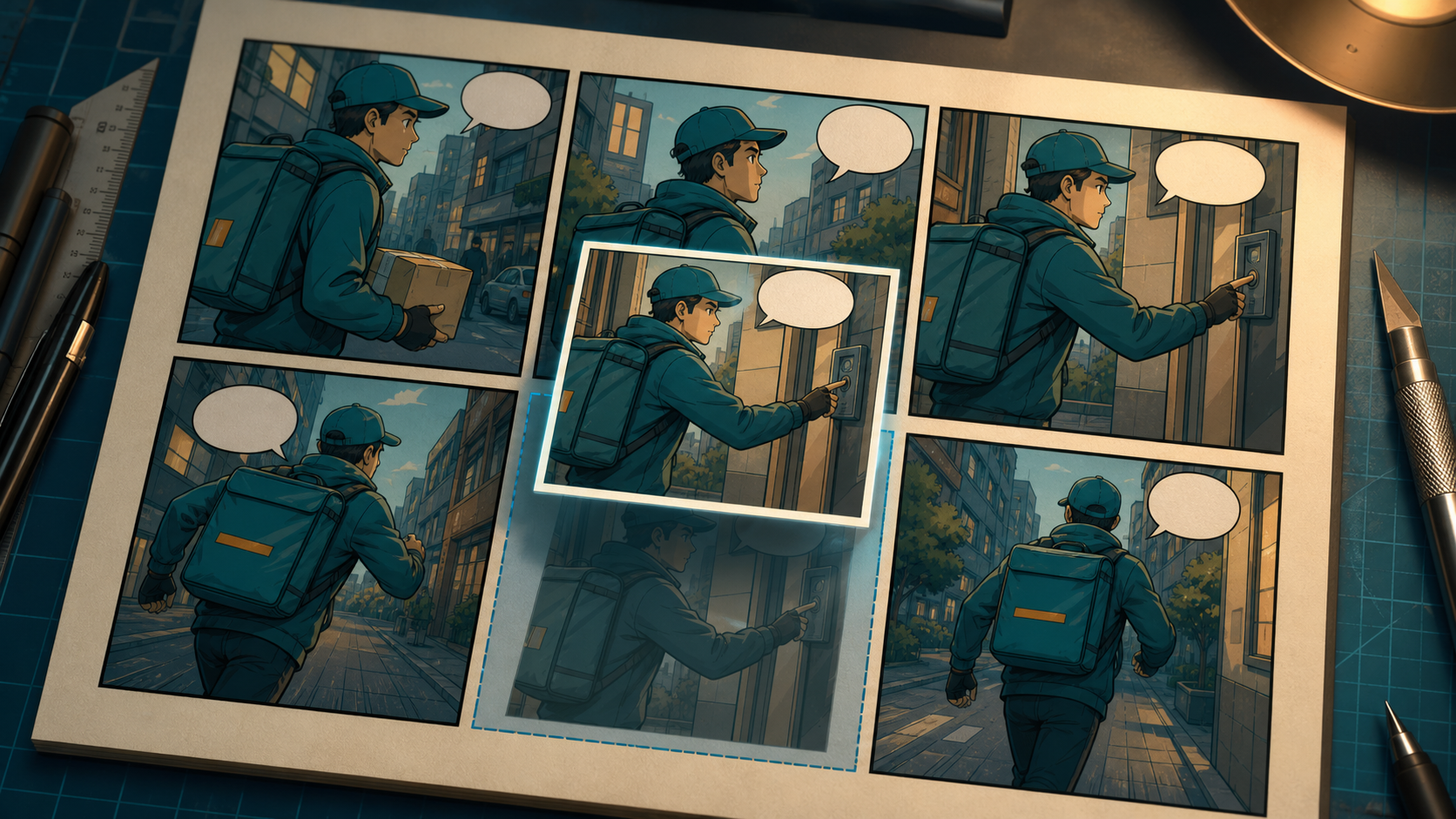
One weak panel does not justify rebuilding an otherwise successful comic page. If the story beat, layout, neighboring art, and dialogue already work, full-page regeneration only creates more opportunities for character drift, broken continuity, and changed composition.
The productive approach is to reduce uncertainty in stages. Diagnose the panel’s actual failure, lock everything that already works, regenerate or edit only the failing region, and compare the replacement with both neighboring panels at the final publishing size.
This guide shows how to make that repair without turning a production correction back into open-ended exploration.
Separate Exploration From Production
Exploration asks, “Which direction feels right?” Production asks, “Can this exact direction survive the next panel, crop, page, or animation?” Mixing the two leads to endless variations that never become publishable.
During exploration, broad regeneration is useful because composition, style, and character design are still undecided. During production, every approved decision becomes an invariant. The purpose of a replacement panel is not to discover a new visual direction; it is to perform the same story function more successfully.
Before generating anything, define an acceptance test for the repaired page:
- Reading order remains immediate.
- Recurring characters remain recognizable.
- Dialogue fits without crowding the art.
- The replacement keeps its intended camera role.
- The panel adds the same new story information.
- Movement and scene state connect with both neighbors.
These checks prevent an attractive replacement from passing when it no longer fits the page.
Step 1: Diagnose the Failure Before Regenerating
Classify the problem first. A panel may fail in more than one way, but identify the earliest structural failure before chasing polish.
| Failure type | Question to ask | Typical correction scope |
|---|---|---|
| Story | Does the panel add the right information? | Rewrite the beat or action |
| Composition | Is the focal point and reading direction clear? | Reframe subjects while preserving panel role |
| Identity | Does the character match the approved reference? | Repair face, proportions, hair, or core design |
| Anatomy | Is the pose physically readable? | Correct the affected body region |
| Continuity | Do wardrobe, props, position, and environment connect? | Restore the mismatched state |
| Lettering | Does text fit and point to the right speaker? | Re-letter without changing successful art |
Do not begin with texture, color grading, or decorative effects if story, identity, anatomy, or reading order is still wrong. Fix format and structure first; later corrections become cheaper.
Step 2: Capture the Panel’s Neighborhood
Review the previous panel, the weak panel, and the next panel together. Write down what enters the panel, what changes inside it, and what must exit toward the next beat.
Track:
- Character position, facing direction, and movement
- Camera distance and height
- Wardrobe layers and temporary damage
- Props carried, dropped, opened, or transferred
- Time of day, weather, and light direction
- Emotional state and gaze
- Dialogue content and required balloon area
A replacement can match its prompt yet fail the sequence. The neighboring panels—not the prompt alone—define whether the repair is successful.
Step 3: Lock the Panel Contract
Record the constraints that must not change. The panel contract should include:
- Exact width, height, aspect ratio, and crop
- The panel’s story job
- Camera role, such as establishing shot, reaction close-up, or impact view
- Entry and exit direction
- Character identity and costume
- Prop and environment state
- Dialogue-safe negative space
- Palette, light source, and rendering style
If the page uses an irregular grid, preserve the precise boundary. A replacement with a slightly different crop may shift visual weight, interrupt eye flow, or leave too little room for lettering.
The correction brief should also state what is allowed to change. For example: “Change only the courier’s left hand and the angle of the package; keep face, jacket, camera, doorway, lighting, and balloon area unchanged.”
Step 4: Return to the Master References
Use the original approved character card, location reference, and prop design. Do not repair a drifted face by copying another panel that has already begun to drift.
The character card should document proportions, facial structure, hairstyle, costume layers, palette, and recurring accessories. A scene ledger should record temporary state such as dirt, damage, weather, or which hand holds an object.
If you need to explore a replacement shot from a written correction brief, a text-to-image workspace can help produce bounded candidates. Keep the page contract and master references outside the generation history so the invariants remain stable.
Step 5: Choose Regeneration or Local Editing
Use whole-panel regeneration when the core story beat, composition, or pose is wrong. Use local editing when most of the panel already works and the failure is limited to a face, hand, sleeve, prop, balloon, or background patch.
Local repair is usually safer late in production because it protects approved composition and lighting. A controlled image-to-image revision may support this stage, but the instruction should reduce scope rather than invite a redesign.
Ask three questions before choosing:
- Would repairing the region preserve more approved work than rebuilding the panel?
- Is the current geometry compatible with the requested change?
- Can the repaired area be checked objectively against a master reference?
If the answer to all three is yes, prefer the smaller edit.
Step 6: Generate a Small Controlled Batch
Keep the source panel, character reference, panel contract, and core prompt fixed. Change one variable per pass and create a small batch, often three or four candidates.
Compare structure before decorative finish:
- Silhouette and anatomy
- Facial identity and age impression
- Perspective and camera distance
- Prop size and orientation
- Movement direction
- Background landmarks
- Dialogue space and focal hierarchy
A useful test uses ordinary, difficult material rather than a perfect showcase image. Include a tight crop, expressive pose, busy background, or strict continuity constraint. That reveals where the workflow bends before you rely on it for an important page.
Step 7: Review at Two Scales
At full resolution, inspect anatomy, hands, masks, seams, textures, duplicated details, lettering, and edge quality. Then place the candidate back into the full page and view it at actual publishing size.
The page-level review should answer:
- Does the eye enter and leave the panel naturally?
- Does the character still read as the same person?
- Is the new panel louder or quieter than its story role requires?
- Does the action connect across the cut?
- Is text legible without covering the focal art?
A technically perfect panel can still fail because its contrast, detail density, or camera distance disrupts the page rhythm.
Step 8: Compare With Both Neighboring Panels
Do not judge the replacement in isolation. Compare it with the panel before it for setup and with the panel after it for consequence.
For a movement beat, check entry and exit direction. For a conversation, check eyelines and speaker positions. For a reaction, confirm that the emotion follows the previous event and leads into the next decision. For a prop interaction, verify which hand holds the object and where it appears afterward.
If the replacement introduces a continuity error, correct the replacement. Do not alter two successful neighbors merely to accommodate one new image.
Step 9: Reinsert, Re-letter, and Export
Place the replacement into the original page grid without changing panel borders or gutters. Restore final dialogue, then inspect balloon margins, tail direction, reading order, spelling, and contrast.
Export a new version without overwriting the last approved page. Keep the source panel, replacement candidates, accepted correction, prompt, references, and reason for approval together. A lightweight creation log is more useful than remembering that one unexplained generation looked good.
Record:
- What failed
- What was allowed to change
- Which reference was used
- Why the chosen replacement passed
- Which minor defects remain, if any
A Realistic Example: The Whispering Package
Imagine a six-panel scene in which a courier discovers that a package is whispering: arrival, odd sound, denial, closer inspection, revelation, and decision.
The fifth panel has the right close-up composition and the correct balloon space, but the courier’s face has changed and the package is suddenly twice as large. The story, camera, background, and lighting already work.
Classify the failures as identity and prop continuity. Lock the crop, doorway, gaze direction, light, jacket, and dialogue area. Return to the original courier character card and package reference. Repair only the face and box size, then compare the result with panel four’s approach and panel six’s reaction.
If the corrected panel looks attractive but turns the courier in the opposite direction, it fails. If the face matches but the balloon covers the package reveal, it also fails. The winning replacement is the one that preserves the page’s causal chain, not the one with the most surface detail.
Common Mistakes and Better Fixes
Assuming a model name guarantees quality
Models behave differently by task, input, crop, and settings. Test a representative panel with real continuity constraints instead of relying on a general reputation.
Ignoring the delivery format
Lock aspect ratio, crop, resolution, and text space before regeneration. A beautiful square candidate does not help when the original slot is a narrow vertical panel.
Changing too many variables
If you alter face, pose, camera, outfit, background, and lighting together, you cannot tell what fixed or broke the sequence. Make one bounded correction per pass.
Comparing only with the prompt
The prompt does not contain the full page rhythm. Always compare the replacement with master references and both neighboring panels.
Polishing before solving structure
Texture and effects cannot rescue the wrong story beat, unreadable pose, or broken identity. Stop at the first failed acceptance check and repair it.
Publishing without a rights review
Regeneration does not erase the rights attached to source portraits, characters, logos, or reference art. Treat provenance and consent as production requirements.
Quality, Safety, and Rights
Do not upload private portraits or another artist’s work merely because a tool accepts the file. Obtain consent for recognizable people, verify permissions for references, and review current usage terms before monetization. Clearly disclose synthetic or conceptual imagery when viewers could mistake it for an authentic event or official work.
For client projects, keep a short rights and provenance record alongside the revision log. It makes later approvals, corrections, and licensing questions easier to resolve.
FAQ
Should I regenerate the entire comic at once?
That may be useful during rough exploration. In production, approve the script and character references first, then review panel by panel and repair weak areas locally.
Do I need professional editing skills?
No, but basic knowledge of composition, continuity, masks, lettering, and file formats makes local repair more reliable. A precise brief and careful review matter more than endless retries.
How many replacement versions should I generate?
Start with a small controlled batch, often three or four. If none solves the structural failure, revise the source, reference, or correction brief before producing more.
Can I use the repaired comic commercially?
Possibly, depending on current platform terms and the rights attached to your source material, characters, brands, and references. Client work deserves a documented rights review.
Conclusion
Regenerating one comic panel is a production repair, not an invitation to redesign the page. Diagnose the failure, lock the panel contract, return to clean references, change one variable at a time, and judge the replacement between its neighbors at publishing size. AI can accelerate the visual correction, but you remain responsible for story function, continuity, rights, and final quality.