A good AI photoshoot begins with a detail you want to keep. For a portrait that might be an original character's face and hair. For a catalog product it might be the color, silhouette, and printed label. After you settle those details, one small change to the prompt can give you a useful second shot for the same campaign.
Use AI Photoshoot with a portrait you are authorized to use or a product image you own. Start with a single clear reference and keep a copy of the prompt that produces the first usable image.
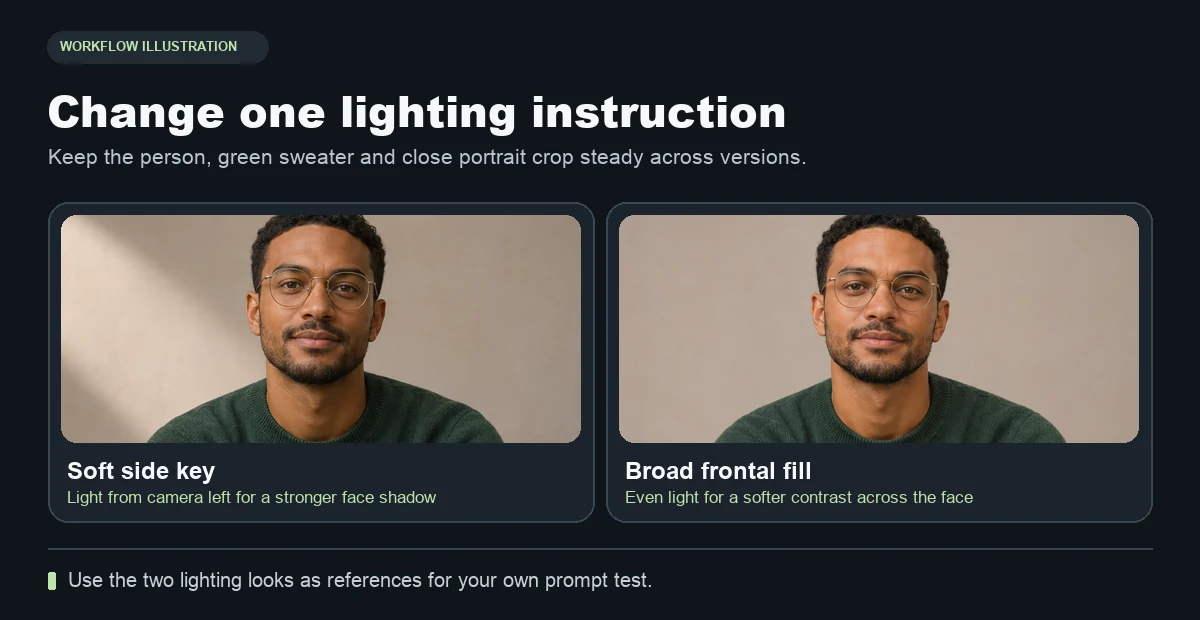
Use the round glasses, the hairline, and the green sweater as fixed details while you compare the changes in light.
A prompt structure you can reuse
| Block | Example | Why it helps |
|---|---|---|
| Reference | Use the subject in the first image. | It names the source to follow. |
| Fixed details | Keep facial structure, hair, and skin tone. | It tells the tool which features matter across images. |
| Crop | Chest-up, eye level, room above the head. | It sets a framing target you can check. |
| Light | One broad soft light from frame left. | It gives the shadows a clear direction. |
| Setting | Plain warm-gray wall and no props. | It helps the key subject remain the center of attention. |
Put the fixed details first so you can reuse them across the set. Keep the crop, lighting, and background in separate sentences. It is easier to test a new light direction when the rest of the prompt stays the same.
Prompt 1 · Neutral studio headshot
Use the first image as the identity reference. Preserve facial features, hairline, skin tone, and apparent age. Create a chest-up portrait at eye level with soft frontal light and a plain warm-gray wall. Keep natural skin texture and leave room above the head.
Generate this version before trying a stronger style. Check the eyes, jawline, and hairline. If the reference is already cropped tightly, use a clearer source before asking for a wider portrait.
Prompt 2 · Side-lit portrait using the same setup
Use the first prompt again. Change “soft frontal light” to “soft directional light from frame left, with gentle shadow on the right side of the face.” Keep the wall and crop unchanged. This isolates the light change and helps you see whether the person remains recognizable in a more directional setup.
For a separate setting test, keep the light direction and chest-up crop, then change the warm-gray wall to a simple interior near a window. Add only the background detail the shot needs. The extra change should have a purpose, such as room for a headline or a warmer editorial mood.
Prompt 3 · Clean product feature shot
Use the product in the first image. Preserve its exact shape, colors, proportions, printed marks, and materials. Frame it on a simple matte tabletop at a three-quarter angle. Use broad window light from frame left and leave open space on the right.
If the product has a label, compare the result with the source at full size. For an e-commerce listing where the backdrop itself must be white, use the separate white background product workflow.
Keep the shots that work as a set
Make a contact sheet with the source and two or three candidates. Compare the subject at the same size and note the one changed prompt line under each. Keep the candidate with the best combination of identity and useful lighting. If the campaign needs a different garment on the same person, use the garment reference workflow as a separate pass.