A short product ad is easier to make when the product does one thing the viewer can see. In this example, a virtual creator shows a matte teal bottle on a desk and puts it into a bag. The bottle has a plain screw cap, a simple silhouette and no brand markings. The viewer should understand the action with the sound off before the edit asks them to look at a product page.
This is a 15-second, UGC-style product demo built around an original fictional adult presenter. Use the AI Influencer Generator for the creator's reference, AI Avatar for the spoken shot and Image to Video for motion where it helps show the product.
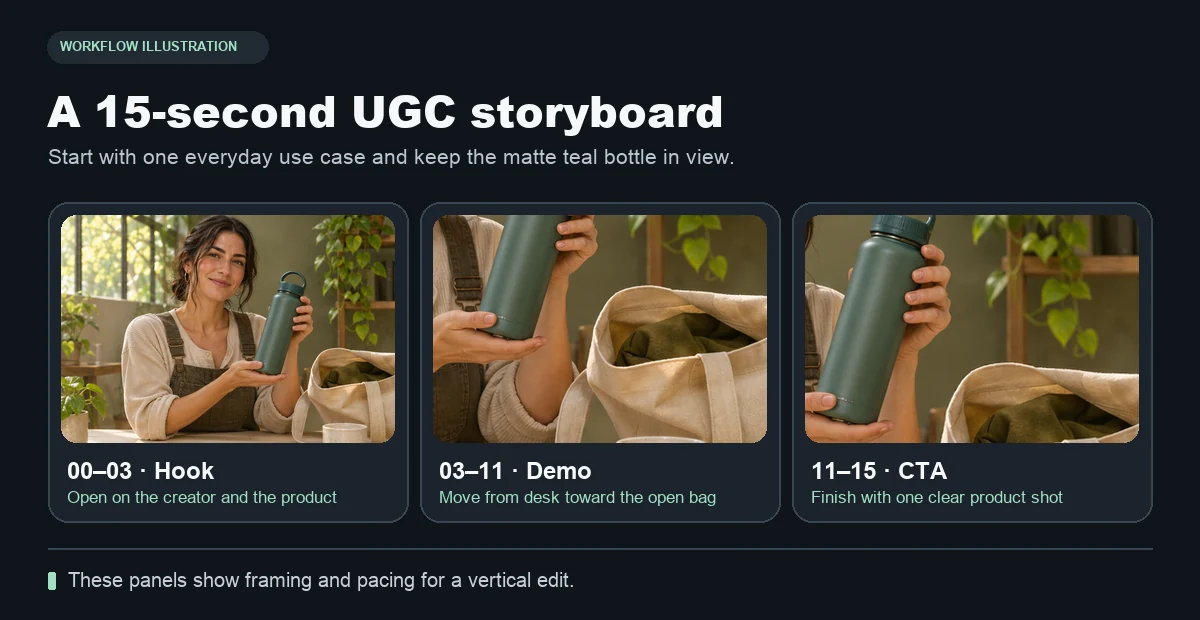
Three shots for one product. Show what it is, show how it is used, then give the viewer a clear next step.
1. Choose the product detail the ad can prove
Write down what you can establish with the assets you have. You can show the bottle standing on a desk, the screw cap, its finish and how it sits inside the bag in your example. Claims about how long a drink stays cold or whether the bottle fits every bag need evidence outside the video. The spoken line can simply be “This is what I pack before I leave,” if the scene visibly demonstrates it.
Prepare a straight-on reference and a three-quarter view of the actual product. Take both in even light and leave the cap fully visible. Keep a product master image handy during review. When a generation changes a feature that matters, return to that reference or cut to the original product photo.
2. Write a three-shot vertical storyboard
| Time | Picture | Sound or text |
|---|---|---|
| 0–3 seconds | Hook. Presenter brings the matte teal bottle into view beside a desk. | One short opening line or caption. Name the item early. |
| 3–11 seconds | Demo. A clear close-up of the bottle and one motion into the bag. | Keep narration on the visible action. Let the important movement finish before cutting. |
| 11–15 seconds | CTA. Stable hero frame on a simple surface with the cap readable. | Add a short caption such as “See the bottle details” in the editor. |
Play the silent 15-second storyboard to see how long each beat holds. It uses still illustrations as timing references for the final footage.
Use 9:16 as the working composition. The presenter can stand higher in the frame, with the bottle and bag near the middle where they remain visible through the action. Keep captions away from the bottle, the hands and the platform's interface overlays. The aspect ratio and safe zone guide can help when checking the final preview.
3. Make the presenter shot and the product shot separately
Start with a clean fictional creator portrait or a reference you are authorized to use. The creator generator can help establish a look and make a campaign still. Keep the same face, hair and outfit as you move from the reference portrait to the opening scene. Record a short line and add it with a clear, mouth-visible image in AI Avatar. Review timing before placing this take on the timeline.
For the demo, use a real product image or footage when exact size, cap shape or packaging matters. If you animate a still, choose one simple movement. An example prompt for an insert is:
Vertical product close-up on a warm desk. The camera drifts gently toward the matte teal bottle. Preserve the straight body, screw cap and exact color. Keep the label area blank and the background still.
For the shot where the bottle moves into a bag, a real recorded clip gives you a reliable hand grip and preserves the dimensions. An animated insert can still be useful for a controlled detail, such as a short camera push toward the bottle before the action. Make the final hero frame from the approved product image and put the call to action over it in the editor.
4. Review what the video actually shows
Check the cap, silhouette, color and any label against the master reference. Look at the fingers and occlusion during the bag shot. If the product changes when it passes behind the hand, replace the take or use an earlier cut. Play the opening at normal speed to check that the line starts when the mouth starts, then review the full clip on a phone with captions and sound off.
Identify the virtual presenter as such where appropriate for the placement. Write the script as a demonstration and keep it clear of invented customer experience, reviews or performance figures. Put product information and required disclosures in text you can verify and edit. Save the final voice track, prompt, creator reference and product image together so you can make a shorter cut or update the caption without rebuilding the shots.
For the creator identity workflow behind the ad, see how to create an AI influencer. For supporting shots built from product and lookbook stills, see the fashion photo to video guide.